



Keyword data from Semrush (US database), 8 Oct 2026. Hands-on testing done in a free AWT account on 8 Oct 2026, on two verified sites we manage.
Ahrefs costs $129 a month at its cheapest. So when people find Ahrefs Webmaster Tools (AWT), the obvious question is: is the free version actually useful, or just a teaser?
We set up a free AWT account, verified the websites we manage, and spent a day inside it. We ran a full Site Audit, dug through backlinks and keywords, and clicked every tool to see what opens and what hits a paywall. Here’s what we found.


Quick verdict: for auditing and monitoring your own website, AWT is the best free SEO tool available. It gives you full backlink data, every keyword you rank for, and a proper technical audit, all at $0. What it won’t do is research other websites. No competitor analysis, no keyword research, no rank tracking. If you only care about your own site, the free version is enough. If you need to spy on competitors or find new keywords, it isn’t.
| Price | Free (verified sites only) |
| Best for | Bloggers, small businesses, freelancers auditing client sites they control |
| Strongest feature | Site Audit + complete backlink and keyword data for your own site |
| Biggest limit | Can’t analyse any domain you haven’t verified |
| Our rating | 4.5/5 as a free tool |
What is Ahrefs Webmaster Tools?
Ahrefs Webmaster Tools is the free version of Ahrefs, built for website owners. It runs on the same backlink index and crawler as the paid plans. The catch is that it only works on sites you prove you own.
You verify a site the same way you would in Google Search Console: a DNS record, an HTML file, a meta tag, or by connecting your Search Console account. Once verified, the site becomes a “project” in your workspace. Our account had seven verified projects, and each one gets the full free toolset.
Inside a project you get two main tools:

- Site Explorer: backlinks, organic keywords, top pages, and traffic estimates for your site.
- Site Audit: a crawler that checks your site against 179 technical and on-page SEO issue types.
Is Ahrefs free? What you get and what’s locked
Yes, part of Ahrefs is free. On the free plan, every tool that looks at your own verified site works. Every tool that looks at someone else’s site, or at keywords in general, is locked.
We opened each tool in the free account. This is what we saw:
Highly Related

| Tool | Free plan | What happened when we opened it |
|---|---|---|
| Site Explorer (your site) | Yes | Full overview, backlinks, organic keywords, top pages, AI responses |
| Site Explorer (any other site) | No | “Domain not verified. You can only check verified domains and their subdomains on a free plan.” |
| Site Audit | Yes | Full crawl and issue reports; 5,000 crawl credits shown in our account |
| Keywords Explorer | No | Landing page with a “See pricing” button |
| Content Explorer | No | Landing page with a “See pricing” button |
| Content gap / Competitive analysis | No | Landing page with a “See pricing” button |
| Rank Tracker | No | Landing page with a “See pricing” button |
| Brand Radar (AI visibility) | Partly | You can set up a brand and competitors, but share of voice, mentions and citations say “Add AI visibility to unlock” |
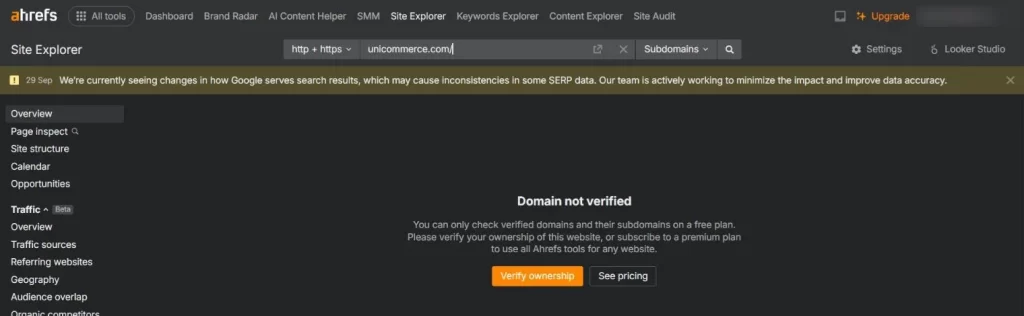
Checking any site you haven’t verified shows this screen on the free plan.

Keywords Explorer, Content Explorer and Rank Tracker all show a pricing page instead.
The short version: AWT is a full SEO toolkit for your own website, and nothing more.
Site Explorer: what you see for your own site
Site Explorer is where AWT surprised us most. For a verified site, the data is not a cut-down version. It’s the same report paid users see.
We tested it on a B2B SaaS site we manage. The overview showed, on one screen:
- Backlink profile: Domain Rating 20, 2.6K live backlinks from 1.2K referring domains (36K backlinks all time).
- Organic search: 47 ranking keywords, 10 of them in the top 3, about 153 monthly organic visits worth an estimated $337.
- AI responses: 85 mentions across AI platforms, including 44 in Google AI Overviews and 34 in AI Mode. Seeing this for free was a pleasant surprise.
- Traffic by country: 52% of organic traffic from the US and 45% from India.
- Crawled pages: 778 pages, 91.4% returning 200 OK.
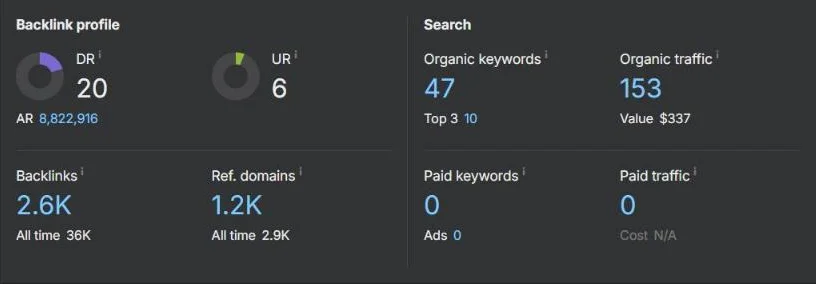
The Site Explorer overview for our verified B2B SaaS site.
Organic keywords report. This lists every keyword the site ranks for (49 when we checked), with volume, keyword difficulty, CPC, position and the ranking URL. You can filter by intent, volume, KD and language, and an Export button sits above the table. It even picked up Hindi queries, which matters for Indian sites.
It also caught a real problem for us. The same article ranked under both the www and non-www version of the domain. That’s a canonical issue we hadn’t noticed.
Backlinks report. We got 1,638 link groups with the referring page, its DR and traffic, anchor text, and dofollow/nofollow/UGC tags. Filters and an Export button are there too.
One quirk. The “branded traffic” chart labelled a large marketplace (Meesho) as our brand, because our blog mentions it. Treat the branded vs non-branded split with some caution.
Site Audit: we crawled a real site
Site Audit is the most useful part of AWT for most site owners. We ran it on a WordPress logistics site we manage and watched the crawl live.
The crawl. It started with robots.txt and the XML sitemaps, then worked through pages at about 1.5 seconds each. The crawl log shows every URL as it’s fetched, with status code, load time and size. The whole crawl took about six minutes.
The result. The site scored 80/100 (“Good”). Ahrefs crawled 148 URLs (96 pages plus 52 resources) and found 429 issues: 37 errors, 297 warnings and 95 notices.
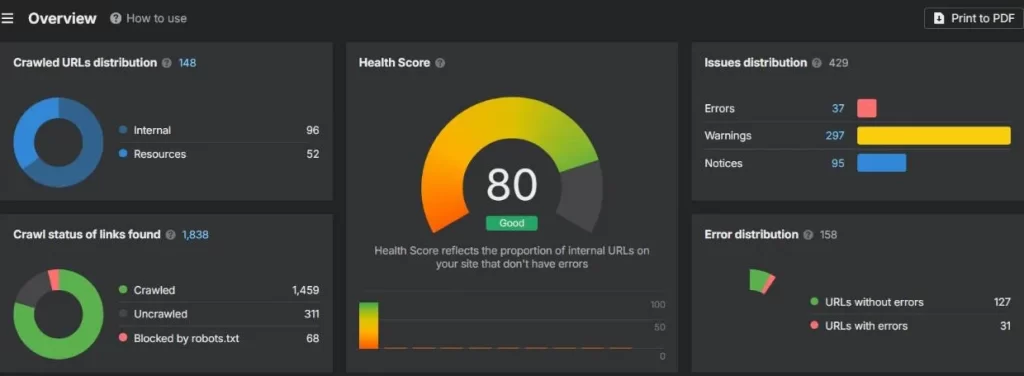
Site Audit results for our WordPress logistics site: health score 80, 429 issues.
The most useful findings:
| Issue | Pages affected |
|---|---|
| Meta description missing or empty | 51 |
| H1 tag missing or empty | 49 |
| 3XX redirects | 27 |
| HTTP to HTTPS redirects | 15 |
| HTTPS page links to HTTP pages | 8 |
| Page has links to redirects | 8 |
| HTTPS/HTTP mixed content | 7 |
| Canonical from HTTPS to HTTP | 6 |
| Canonical points to a redirect | 6 |
| Slow server response for AI crawlers | 5 |
| Multiple H1 tags | 3 |
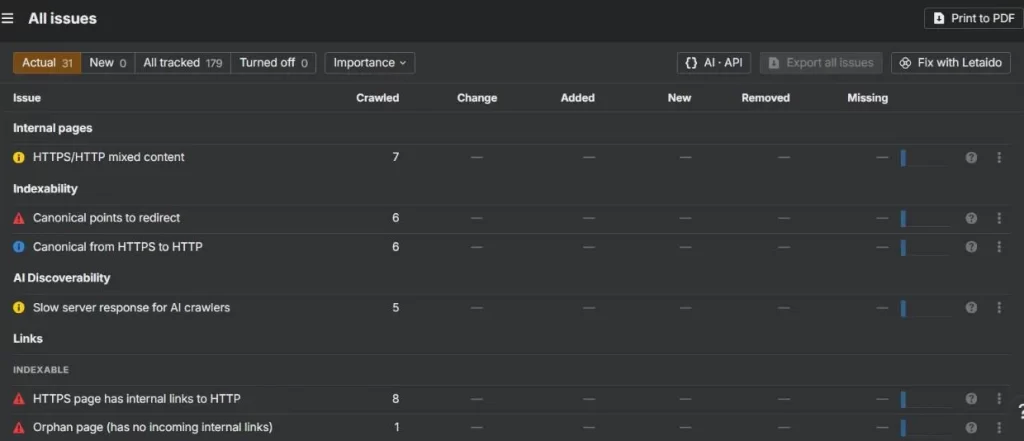
The All issues report groups problems by type, including a newer AI Discoverability category.
The crawl log also turned up leftover demo pages from the WordPress theme (URLs like /slide-page/construction-portfolio-florida/) that still redirect, plus dozens of thin tag archive pages. We’d never have found those by hand.
A newer check stood out too: “Slow server response for AI crawlers”, filed under an “AI Discoverability” category. That’s useful now that ChatGPT and Google AI answers pull from websites. (On ChatGPT Go’s free India offer? Here’s what happens when the ChatGPT Go free year ends.) If you use AI in your own workflow too, see our list of the best AI tools for small business in India.
Beyond the issue list, the free Site Audit includes Page explorer, Link explorer, Internal link opportunities, Structure explorer, and a “Print to PDF” option. For a free tool, that’s a lot.
Ahrefs Webmaster Tools vs Google Search Console
Use both. They answer different questions, and both are free. For more no-cost and low-cost options, see our guide to the best SEO tools for small businesses.
Google Search Console shows Google’s own data: real clicks, impressions, indexing status and manual actions. AWT shows what Ahrefs’ crawler sees: backlinks, keyword difficulty, a full technical audit, and estimated traffic.
| Google Search Console | Ahrefs Webmaster Tools | |
|---|---|---|
| Data source | Google’s real search data | Ahrefs’ crawler and index |
| Clicks and impressions | Exact | Estimated |
| Indexing and coverage | Yes | No |
| Backlinks | Basic list (top links) | Full list with DR, anchors, nofollow/UGC tags |
| Keyword difficulty and volume | No | Yes |
| Technical site audit | Limited (Core Web Vitals, page experience) | Full crawl with 179 issue types |
| AI visibility (AI Overviews, ChatGPT) | No | Yes, on the overview |
| Cost | Free | Free for verified sites |
Our workflow: check Search Console for indexing problems and real click data. Then use AWT to find technical fixes and track backlinks.
Limitations of the free version
The limits are clear-cut, and you’ll hit them on day one if you do any research beyond your own site.
- No competitor research. Type any domain you haven’t verified into Site Explorer and you get a “Domain not verified” screen. You can see a list of your organic competitors, but you can’t click through to analyse them.
- No keyword research. Keywords Explorer is fully locked. You can see keyword data for terms you already rank for, but you can’t look up new ones.
- No rank tracking. Rank Tracker is paid-only, so you can’t monitor a fixed list of target keywords over time.
- No content gap or Content Explorer. Both show only a pricing page.
- Limited AI visibility. The overview counts your AI mentions, but Brand Radar’s share-of-voice and citation reports need a paid add-on.
- Crawl credit cap. Our account showed 5,000 crawl credits. That’s plenty for a small blog, but a large online store with tens of thousands of URLs won’t fit in one audit. If you’re still picking a store builder, see our best ecommerce platforms in India.
- Estimated data. Traffic numbers are Ahrefs’ estimates, not real visits. Ahrefs also showed a banner (dated 29 Sep 2026) that changes in how Google serves results “may cause inconsistencies in some SERP data”.
Ahrefs pricing: when to upgrade
The cheapest paid plan is $129 a month. Upgrade only when you need to research sites and keywords that aren’t yours. Before you pay, check our Semrush vs Ahrefs comparison to see which suits you better.
| Plan | Price (monthly billing) | Projects | Tracked keywords | Crawl credits | History |
|---|---|---|---|---|---|
| Webmaster Tools | Free | Verified sites only | None | 5,000 (as shown in our account) | All time (our charts went back to 2015) |
| Lite | $129/mo | 5 | 750 | 100,000 | 6 months |
| Standard | $249/mo | 20 | 2,000 | 500,000 | 2 years |
| Advanced | $449/mo | 50 | 5,000 | 1,500,000 | 5 years |
Annual billing saves up to 17%. Prices are from Ahrefs’ pricing page, checked 8 Oct 2026.
Stick with the free version if you run one or a few sites and mainly need audits and backlink monitoring. Upgrade when:
- you do keyword research for new content every week,
- you need to analyse competitors’ backlinks and top pages, or
- you track rankings for clients.
Is Ahrefs worth it? Our verdict
The free version is worth it for almost every website owner. Paid Ahrefs is worth it only if SEO research is part of your job.
In one session, AWT found missing H1s and meta descriptions on about 50 pages, broken canonicals, and HTTP/HTTPS mixed content on one site. On another, it showed every keyword we rank for and a duplicate www/non-www ranking issue. All of it cost nothing.
What the free version can’t do is help you decide what to write next or how to beat a competitor. That’s the job of Keywords Explorer and competitor Site Explorer, and they start at $129 a month.
Our recommendation:
- Bloggers and small business owners: use AWT plus Google Search Console. You don’t need more. Pair them with the best marketing software for small businesses in India for email and social.
- Content marketers publishing weekly: AWT for audits, plus a cheaper keyword tool. Upgrade to Lite once SEO brings in revenue.
- Agencies and freelancers: a paid plan pays for itself. You can still verify client sites in AWT for free audits.
FAQ
Partly. Ahrefs Webmaster Tools is free and gives you Site Explorer and Site Audit for websites you verify. Keyword research, competitor analysis and rank tracking need a paid plan, from $129 a month.
Sign up for Ahrefs Webmaster Tools, then verify your site through Google Search Console, DNS, an HTML file or a meta tag. Run Site Audit first, then check your backlinks and organic keywords in Site Explorer.
The pricing page we checked lists paid plans only. The free way to use Ahrefs is Webmaster Tools.
Yes, as long as you can verify each one. Our free workspace had seven verified projects.
Backlink and ranking data comes from Ahrefs’ own crawler and is generally reliable. Traffic is an estimate, so use Google Search Console for real clicks.
Domain Rating (DR) is Ahrefs’ 0-100 score for the strength of a site’s backlink profile. Higher means stronger links. It’s an Ahrefs metric, not a Google ranking factor.
In our account, keyword positions showed update dates from a few days to about a month old, and crawled pages refresh as the crawler revisits them.
Neither replaces the other. Search Console has Google’s real data. AWT adds backlinks, keyword difficulty and a full technical audit. Use both.
Fur alle, die eine seriose Online-Casino-Plattform wie Sugar Casino suchen, bietet diese Seite wertvolle Einblicke in Bewertungen und Testversionen Sugarcasino Erfahrungen . Von klassischen Slots bis zu Live-Casino-Spielen: Sugar Casino bietet eine breite Spielpalette, die durch eine klare Struktur und einfache Bedienung besticht. Viele Nutzer, die Sugar Casino bereits getestet haben, loben besonders die gro?e Spielauswahl und die einfache Handhabung der Plattform. Die ausfuhrlichen Sugar Casino Testberichte bieten eine solide Grundlage, um vor der Anmeldung die richtige Entscheidung zu treffen. Fur alle, die Wert auf Fairness und Transparenz legen, ist die Prufung der Sugar Casino Seriositat ein entscheidender Faktor. Wer auf eine hochwertige Spielauswahl und erstklassige Angebote Wert legt, findet bei Sugar Casino die perfekte Plattform.
Die Plattform kooperiert mit fuhrenden Spielanbietern, die eine breite Palette an hochwertigen Spielen von thematischen Slots bis zu strategischen Tischspielen bereitstellen Asino Casino Spielen. Durch die Sugar Casino Testversion wird deutlich, dass die Plattform sowohl optisch uberzeugt als auch technisch zuverlassig lauft. Die schnellen Transfers und die klare Aufklarung der Spielbedingungen sind laut Nutzerfeedback ein gro?er Pluspunkt von Sugar Casino. Die Moglichkeit, verschiedene Zahlungsmethoden zu nutzen, erhoht die Flexibilitat fur Spieler, die Wert auf bequeme Transaktionen legen. Fur Spieler, die stets nach neuen Spielmoglichkeiten Ausschau halten, bietet Sugar Casino durch regelma?ige Updates und neue Titel eine standige Uberraschung. Wer eine zeitgema?e, aber trotzdem klassisch gepragte Online-Casino-Plattform wie Sugar Casino sucht, findet hier die perfekte Kombination Online Casino Slotoro.
Wer sich fur eine Sugar Casino Erfahrung entscheidet, findet hier eine Mischung aus Einfachheit und Vielfalt, die sowohl Neulinge als auch erfahrene Spieler anspricht. Die klare Kommunikation in Sugar Casino Bewertungen reduziert Unsicherheiten bei der Registrierung oder den Spielbedingungen. Wer eine vertrauenswurdige Online-Casino-Plattform wie Sugar Casino wahlt, sollte die Testberichte sorgfaltig prufen, um sich ein umfassendes Bild zu machen. Am Ende bleibt festzuhalten, dass Sugar Casino eine solide Wahl fur alle ist, die eine zuverlassige und unterhaltsame Spielumgebung suchen. Die Plattform bietet eine moderne und gut organisierte Umgebung, die sowohl Einsteiger als auch erfahrene Spieler anspricht.