




Last updated: 14 October 2026. Model details are taken from each project’s official GitHub or Hugging Face page, checked on this date.
- Quick Picks: Best Open-Source AI Video Generator for Each Need
- What Is an Open-Source AI Video Generator?
- How We Picked These Models
- The 8 Best Open-Source AI Video Generators in 2026
- Is Wan 3.0 Open Source?
- Side-by-Side Comparison Table
- How Much VRAM Do You Need for AI Video?
- How to Run an AI Video Generator Locally (Step by Step)
- No GPU? Try These Models for Free
- Open-Source vs Paid AI Video Tools: Which Should You Use?
- How Small Businesses Can Use Open-Source AI Video
- Conclusion: Pick the Model That Fits Your GPU
- Frequently Asked Questions
Paid AI video tools look great in demos. Then you see the bill. Most charge per second of video, add watermarks on free plans, and keep your prompts on their servers.
So here’s a fair question: can you make AI videos for free, on your own computer?


Yes, you can. A new wave of open-source AI video generators lets you download the model, run it on your own GPU, and keep every clip. Some of them now come close to paid tools on quality.
In this guide, you’ll learn:
- The 8 best open-source AI video generators in 2026, and what each one is good at
- How much GPU memory (VRAM) you really need
- Which licenses allow commercial use
- How to run them locally with ComfyUI, or try them free without a GPU
Let’s start with the quick answer.


Quick Picks: Best Open-Source AI Video Generator for Each Need
| Your situation | Best pick | Why |
|---|---|---|
| Best overall quality | Wan 2.2 | Strong motion, Apache 2.0 license, huge community |
| Video with sound | LTX-2 | Generates audio and video together |
| Mid-range GPU (12 to 16GB) | HunyuanVideo 1.5 | Runs in about 14GB with offloading |
| Low-end GPU (4 to 10GB) | CogVideoX | The 2B model needs only about 4GB |
| Longer clips | SkyReels V2 | Built for very long, continuous video |
| Fine-tuning on your own clips | Mochi 1 | Apache 2.0 with an official LoRA trainer |
Not sure what VRAM means yet? Don’t worry. We explain it in plain words further down.
What Is an Open-Source AI Video Generator?
An open-source AI video generator is a video model whose weights (the trained “brain” of the model) are free to download. You can run it on your own machine, change it, and often use the output commercially.
Think of it like a recipe versus a restaurant. A paid tool like Runway is the restaurant: you order and pay per plate. An open model is the recipe: you cook it yourself, as often as you like, in your own kitchen.
Open source vs open weights: does it matter?
A little. Strictly speaking, many of these models are “open weights”, not fully open source. You get the model, but not always the training data or full training code.
What matters more for you is the license:
- Apache 2.0 or MIT: Free for personal and commercial use. The safest choice.
- Community licenses: Free up to a limit, such as a revenue cap or certain regions. Read the terms before using clips for clients.
We list the license for every model below.
How We Picked These Models
We focused on models that a real person can actually use in 2026. Each one had to:
- Offer downloadable weights on GitHub or Hugging Face
- Work with ComfyUI or a simple Python setup
- Have active community support, so you can find help and workflows
- Be relevant today, based on search interest and recent releases
We pulled specs like VRAM, resolution and license from each model’s official page. Real-world speed depends heavily on your GPU and settings, so treat numbers as starting points.
The 8 Best Open-Source AI Video Generators in 2026
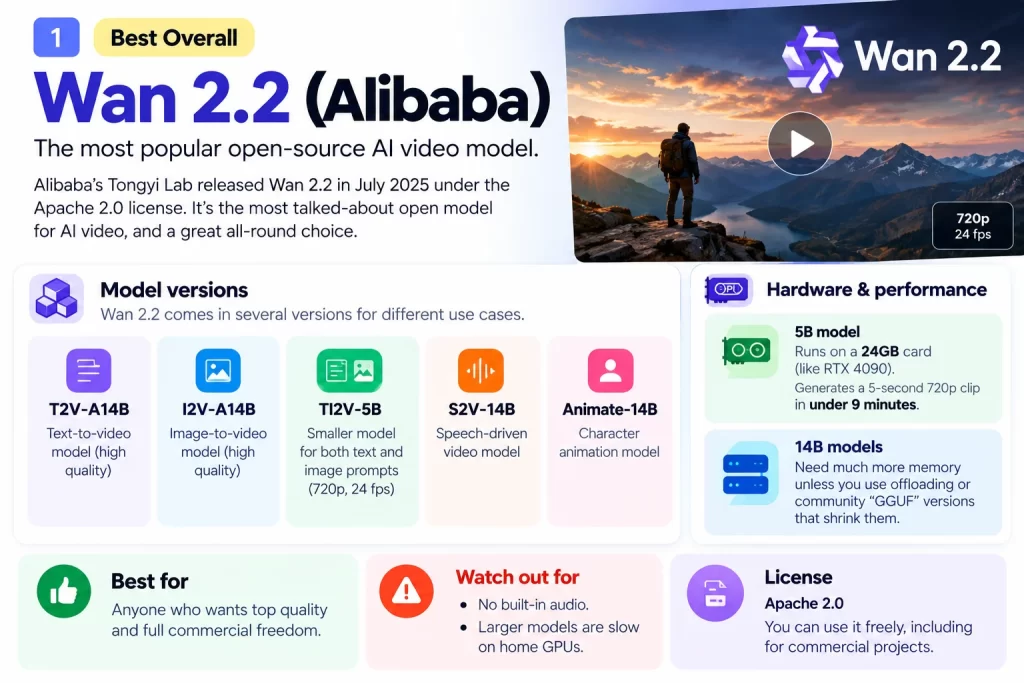
1. Wan 2.2 (Alibaba): Best Overall
If you search for open-source AI video, you’ll see Wan 2.2 everywhere. It’s the most popular open model by a wide margin. Alibaba’s Tongyi Lab released it in July 2025 under the Apache 2.0 license.
Wan 2.2 comes in several versions:
- T2V-A14B and I2V-A14B: The big text-to-video and image-to-video models. They use a “Mixture of Experts” design, which splits the work between specialist parts of the model.
- TI2V-5B: A smaller model that handles both text and image prompts at 720p and 24 fps.
- S2V-14B and Animate-14B: For speech-driven video and character animation.
Hardware: According to the official Wan 2.2 GitHub page, the 5B model runs on a 24GB card like the RTX 4090 and makes a 5-second 720p clip in under 9 minutes. The big 14B models need far more memory unless you use offloading or community “GGUF” versions that shrink them.
Best for: Anyone who wants top quality and full commercial freedom.
Watch out for: No built-in audio, and the larger models are slow on home GPUs.
2. LTX-2 (Lightricks): Best for Video With Sound
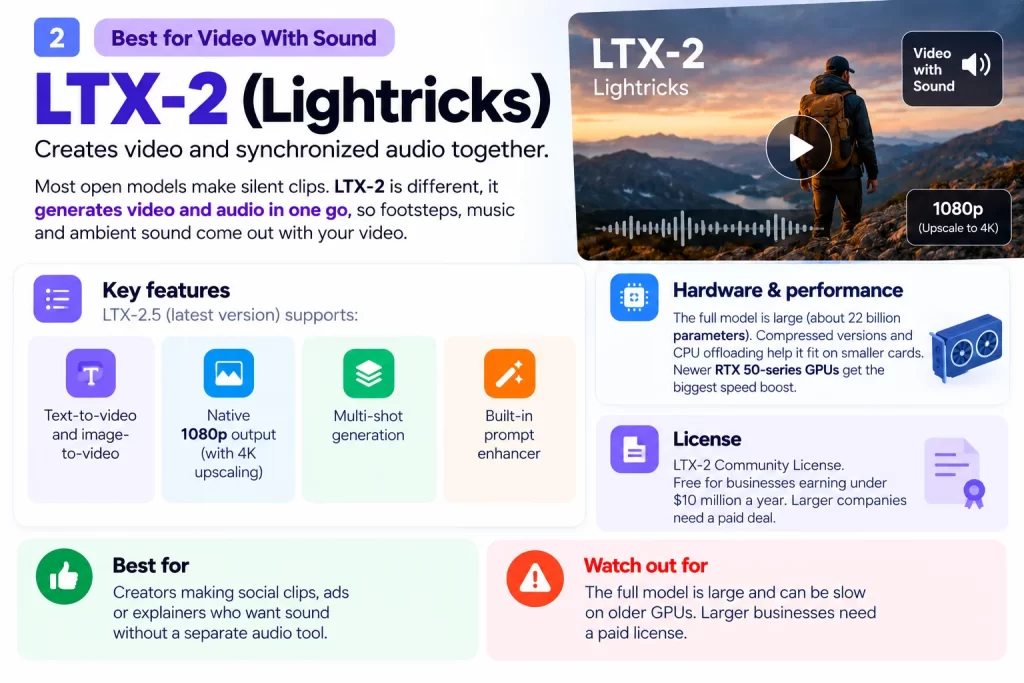
Most open models make silent clips. LTX-2 is different. It creates video and synchronized audio together, so footsteps, music and ambient sound come out in one go.
The LTX-2 family keeps getting updates. The latest version on Hugging Face, LTX-2.5, supports:
- Text-to-video and image-to-video
- Native 1080p output, with an upscaling stage for 4K
- Multi-shot generation and a built-in prompt enhancer
Hardware: The full model is large (about 22 billion parameters). However, compressed versions and CPU offloading help it fit on smaller cards. Newer RTX 50-series GPUs get the biggest speed boost.
License: The LTX-2 Community License. It’s free for businesses earning under $10 million a year. Larger companies need a paid deal.
Best for: Creators making social clips, ads or explainers who want sound without a separate audio tool.
3. HunyuanVideo 1.5 (Tencent): Best for Mid-Range GPUs
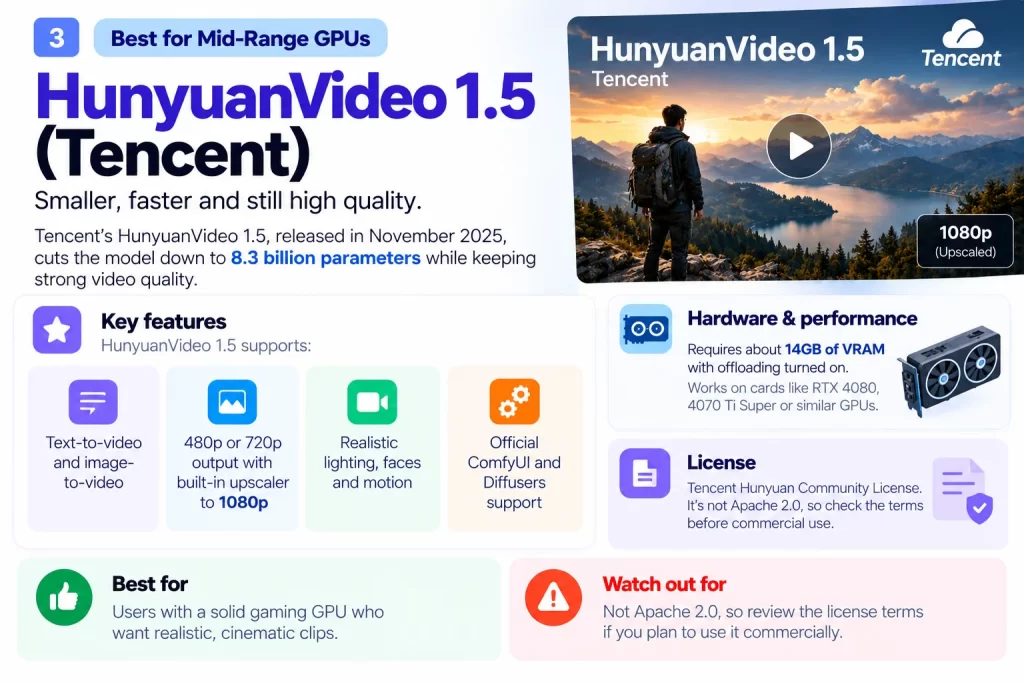
Tencent’s original HunyuanVideo was powerful but heavy. Version 1.5, released in November 2025, cuts the model down to 8.3 billion parameters while keeping strong quality.
Highlights:
- Text-to-video and image-to-video at 480p or 720p
- A built-in upscaler that takes output to 1080p
- Realistic lighting, faces and motion
- Official ComfyUI and Diffusers support
Hardware: Tencent lists about 14GB of VRAM with offloading turned on. That puts it within reach of an RTX 4080, 4070 Ti Super, or similar cards.
License: Tencent Hunyuan Community License. It’s not Apache 2.0, so check the terms before commercial use.
Best for: Users with a solid gaming GPU who want realistic, cinematic clips.
4. CogVideoX (Zhipu AI): Best for Low-End GPUs
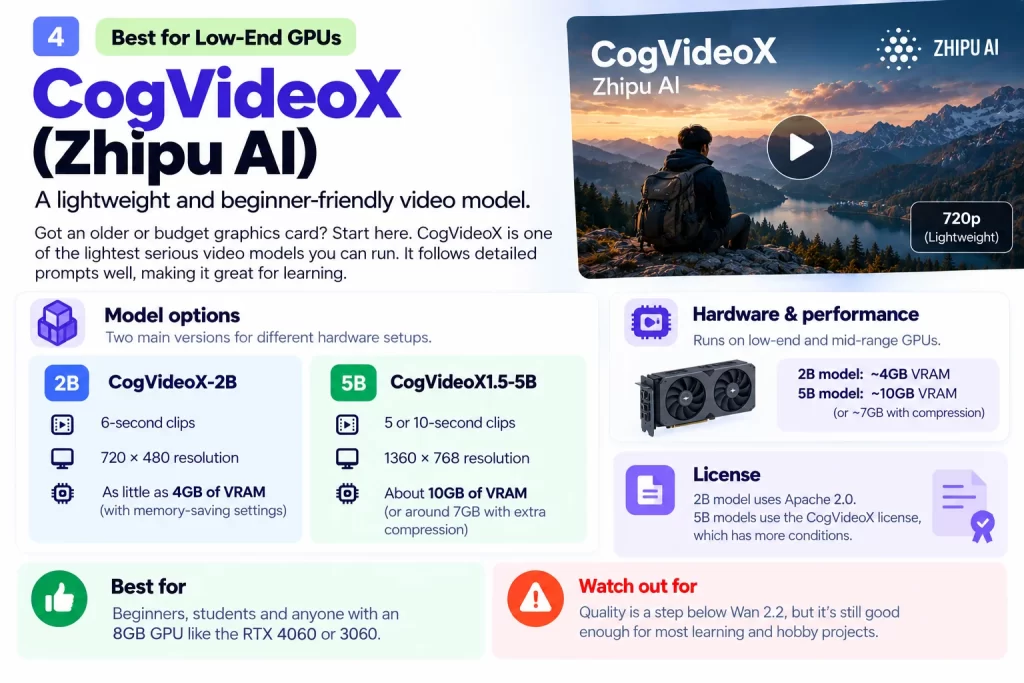
Got an older or budget graphics card? Start here. CogVideoX is one of the lightest serious video models you can run.
There are two main options:
- CogVideoX-2B: Makes 6-second clips at 720 x 480. It needs as little as 4GB of VRAM with memory-saving settings.
- CogVideoX1.5-5B: Makes 5 or 10-second clips at 1360 x 768. It needs about 10GB of VRAM (or around 7GB with extra compression).
The quality is a step below Wan 2.2. Still, it follows detailed prompts well, which makes it great for learning.
License: The 2B model uses Apache 2.0. The 5B models use the CogVideoX license, which has more conditions.
Best for: Beginners, students and anyone with an 8GB GPU like the RTX 4060 or 3060.
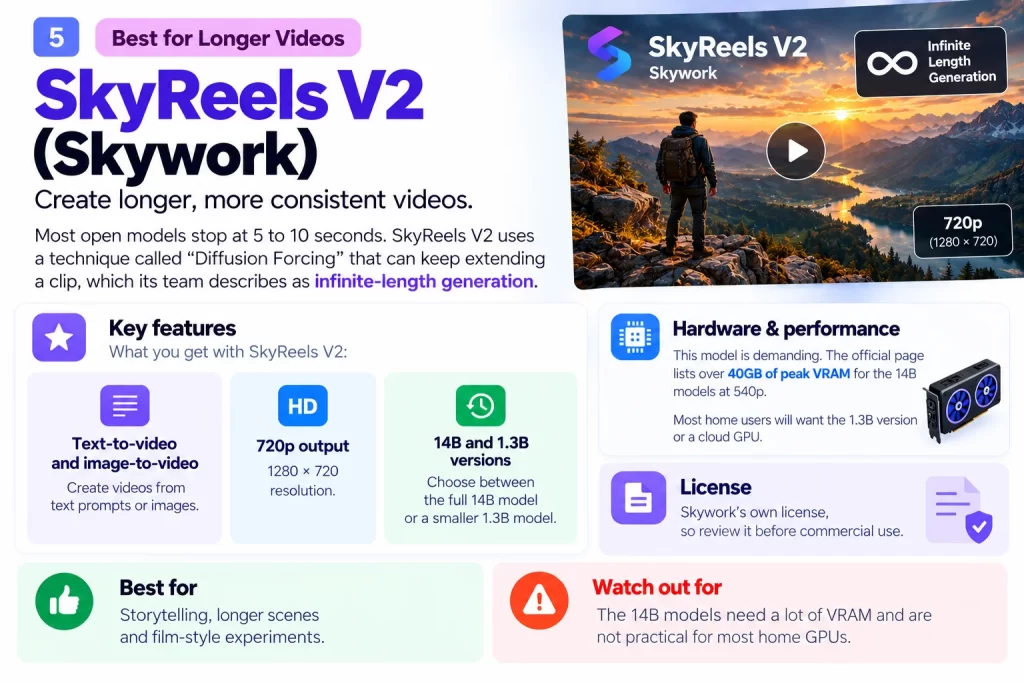
5. SkyReels V2 (Skywork): Best for Longer Videos
Most models stop at 5 to 10 seconds. SkyReels V2 uses a technique called “Diffusion Forcing” that can keep extending a clip, which its team describes as infinite-length generation.
What you get:
- 720p output (1280 x 720)
- Text-to-video and image-to-video
- 14B and smaller 1.3B versions
Hardware: This one is demanding. The official page lists over 40GB of peak VRAM for the 14B models at 540p. Most home users will want the 1.3B version or a cloud GPU.
License: Skywork’s own license, so review it before commercial use.
Best for: Storytelling, longer scenes and film-style experiments.
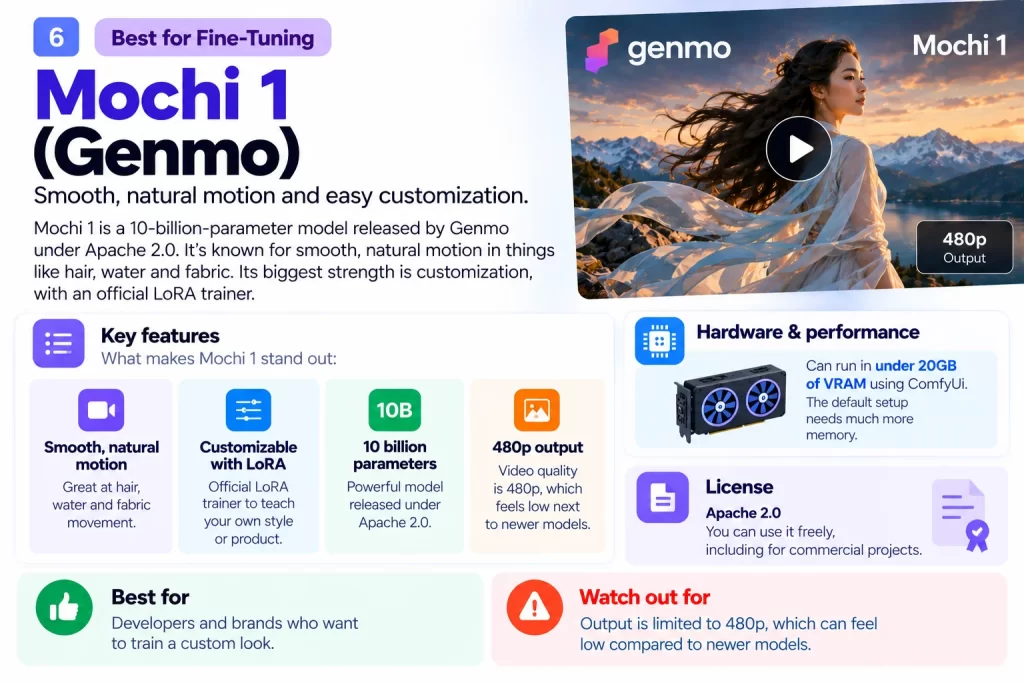
6. Mochi 1 (Genmo): Best for Fine-Tuning
Mochi 1 is a 10-billion-parameter model released under Apache 2.0. It’s known for smooth, natural motion in things like hair, water and fabric.
Its biggest strength is customization. Genmo provides an official LoRA trainer, so you can teach the model your own style or product using your own video clips.
Hardware: Genmo says ComfyUI can run Mochi in under 20GB of VRAM. The default setup needs much more.
Limits: Output is 480p, which feels low next to newer models.
Best for: Developers and brands who want to train a custom look.
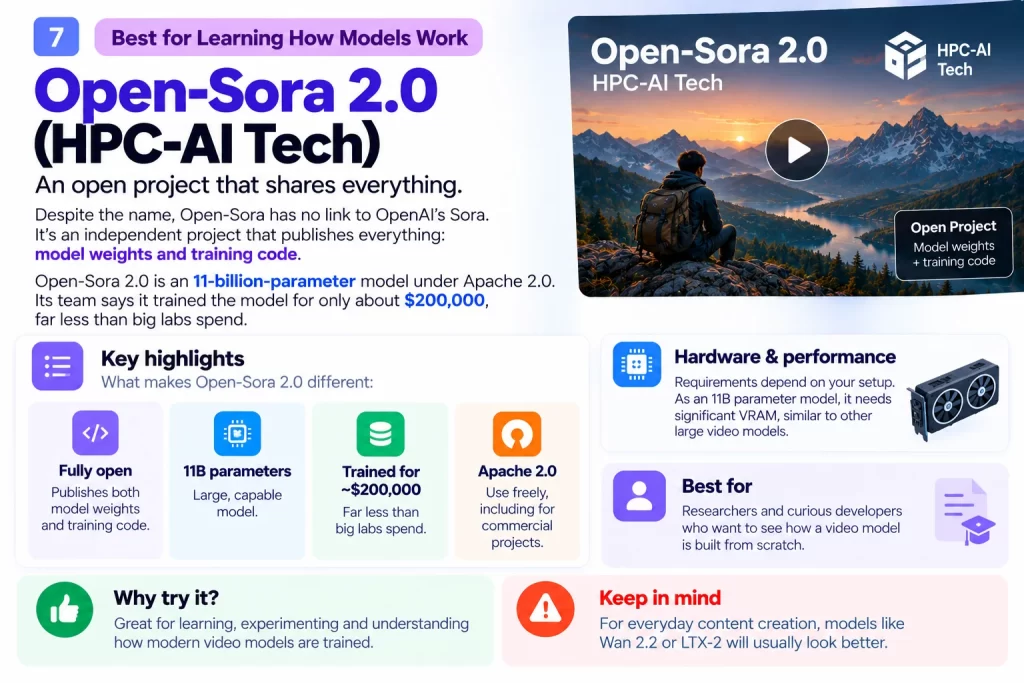
7. Open-Sora 2.0 (HPC-AI Tech): Best for Learning How Models Work
Despite the name, Open-Sora has no link to OpenAI’s Sora. It’s an independent project that publishes everything: model weights and training code.
Open-Sora 2.0 is an 11-billion-parameter model under Apache 2.0. Its team says it trained the model for only about $200,000, far less than big labs spend.
Best for: Researchers and curious developers who want to see how a video model is built from scratch. For everyday content, Wan 2.2 or LTX-2 will look better.
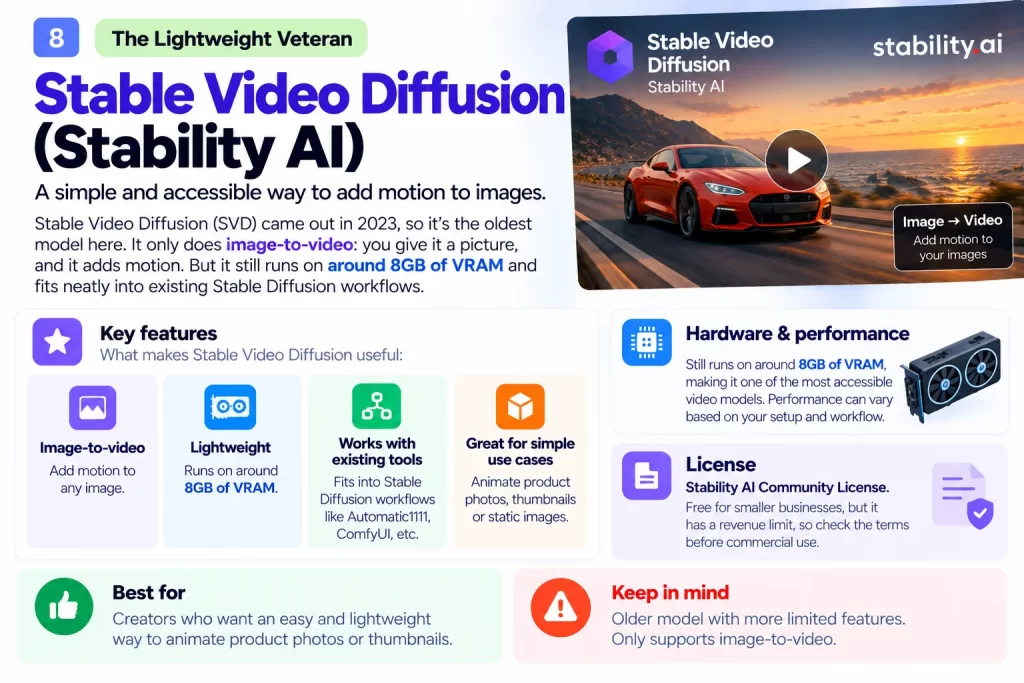
8. Stable Video Diffusion (Stability AI): The Lightweight Veteran
Stable Video Diffusion (SVD) came out in 2023, so it’s the oldest model here. It only does image-to-video: you give it a picture, and it adds motion.
So why include it? Because it still runs on around 8GB of VRAM and fits neatly into existing Stable Diffusion workflows. It’s a simple way to animate product photos or thumbnails.
License: Stability AI Community License, which is free for smaller businesses but has a revenue limit.
Is Wan 3.0 Open Source?
You’ve probably seen headlines about Wan 3.0. Many blogs claim it’s already open source. Here’s what we found.
As of 14 October 2026, Alibaba’s official Wan-AI page on Hugging Face does not list any Wan 3.0 model weights. The newest official releases there are Wan 2.2 variants, such as Animate-2.
So what does that mean for you?
- Treat “Wan 3.0 open source” claims with caution until weights appear on the official page.
- Earlier versions like Wan 2.5 and 2.6 were reportedly offered through paid APIs rather than as open downloads.
- For now, Wan 2.2 is the latest Wan model you can download and run yourself.
We’ll update this section if that changes.
Side-by-Side Comparison Table
| Model | Developer | Max resolution | Audio | Min VRAM (approx.) | License |
|---|---|---|---|---|---|
| Wan 2.2 | Alibaba | 720p | No | 24GB (5B model) | Apache 2.0 |
| LTX-2 | Lightricks | 1080p (4K upscale) | Yes | 16GB+ with compression | Free under $10M revenue |
| HunyuanVideo 1.5 | Tencent | 720p (1080p upscale) | No | 14GB | Tencent Community |
| CogVideoX | Zhipu AI | 1360 x 768 | No | 4GB (2B model) | Apache 2.0 (2B) |
| SkyReels V2 | Skywork | 720p | No | 40GB+ (14B) | Skywork License |
| Mochi 1 | Genmo | 480p | No | Under 20GB (ComfyUI) | Apache 2.0 |
| Open-Sora 2.0 | HPC-AI Tech | About 1024 x 576 | No | Not listed | Apache 2.0 |
| Stable Video Diffusion | Stability AI | 1024 x 576 | No | About 8GB | Stability Community |
VRAM figures come from official pages and assume memory-saving options where noted. Community versions can lower them further.
How Much VRAM Do You Need for AI Video?
VRAM is the memory on your graphics card. Think of it as the size of your workbench. A bigger bench lets you work on bigger projects without constantly moving things around.
Here’s a simple guide:
| Your GPU memory | Example cards | What you can run |
|---|---|---|
| 4 to 8GB | RTX 3050, RTX 4060 | CogVideoX-2B, Stable Video Diffusion |
| 10 to 12GB | RTX 3060 12GB, RTX 4070 | CogVideoX1.5-5B, compressed Wan 2.2 5B |
| 16GB | RTX 4060 Ti 16GB, RTX 4080 | HunyuanVideo 1.5, compressed LTX-2 |
| 24GB | RTX 3090, RTX 4090 | Wan 2.2 5B, Mochi 1, most models with offloading |
| 40GB and up | Cloud GPUs (A100, H100) | Full-size Wan 2.2 14B, SkyReels V2 14B |
A tip for readers in India: the RTX 3060 12GB is still one of the best-value cards for local AI video. It costs far less than a 4090 and handles most beginner-friendly models.
Also, keep in mind that more VRAM mostly means less waiting, not just better quality. A smaller card can often run the same model, only slower.
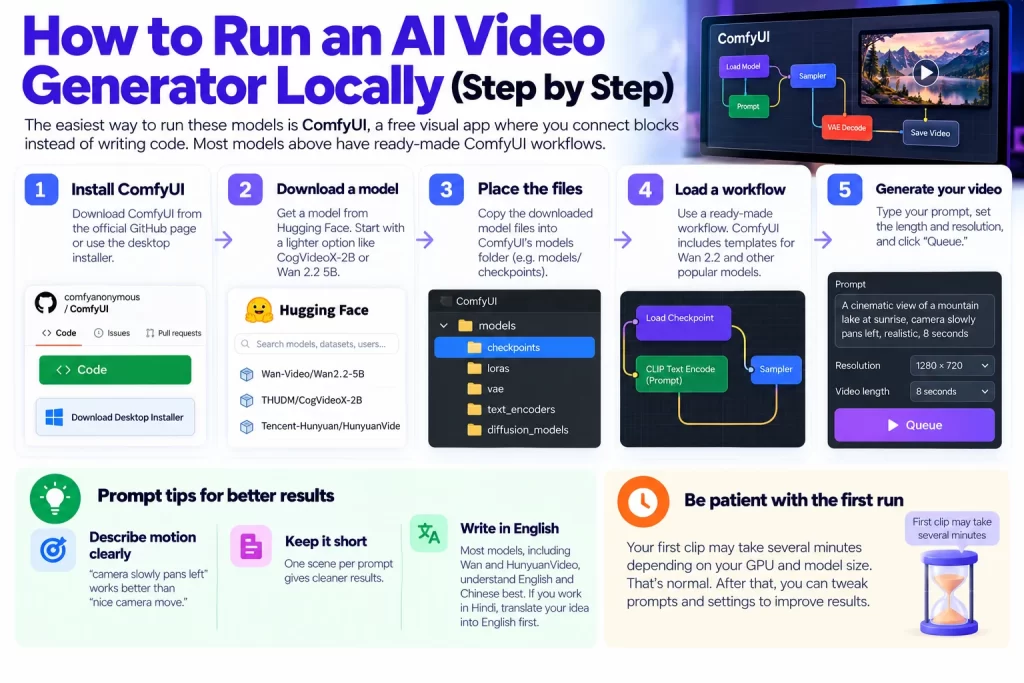
How to Run an AI Video Generator Locally (Step by Step)
The easiest way to run these models is ComfyUI, a free visual app where you connect blocks instead of writing code. Most models above have ready-made ComfyUI workflows.
Here’s the basic process:
- Install ComfyUI from its official GitHub page or the desktop installer.
- Download a model from Hugging Face. Start with something light, like CogVideoX-2B or Wan 2.2 5B.
- Place the files in ComfyUI’s models folder.
- Load a workflow. ComfyUI includes templates for Wan 2.2 and other popular models.
- Type your prompt, set the length and resolution, and click “Queue.”
Your first clip may take several minutes. That’s normal. After that, you can tweak prompts and settings to improve results.
Prompt tips for better results
- Describe motion clearly: “camera slowly pans left” works better than “nice camera move.”
- Keep it short: One scene per prompt gives cleaner results.
- Write in English: Most models, including Wan and HunyuanVideo, understand English and Chinese best. If you work in Hindi, translate your idea into English first.
No GPU? Try These Models for Free
Don’t have a powerful graphics card? You still have options.
- Hugging Face Spaces: Many models have free online demos. Expect queues and short clip limits.
- Google Colab: The free tier sometimes gives you a GPU, which can handle lighter models like CogVideoX-2B.
- Pay-per-hour cloud GPUs: Services like RunPod let you rent a powerful GPU for a few hours. It’s often cheaper than a monthly subscription if you only make videos occasionally.
Open-Source vs Paid AI Video Tools: Which Should You Use?
Open models aren’t perfect for everyone. Here’s an honest comparison.
Choose open source if you:
- Want no watermarks and no per-video fees
- Need privacy for client or product content
- Enjoy tinkering, or already own a good GPU
Choose a paid tool (like Runway, Kling or Veo) if you:
- Need the highest quality with zero setup
- Want results in seconds, not minutes
- Don’t have a GPU and don’t want to manage cloud servers
Many creators use both. They draft ideas on a free local model, then use a paid tool for the final, client-ready version.
How Small Businesses Can Use Open-Source AI Video
You don’t need a film studio to benefit from these tools. Here are practical ways Indian small businesses and marketers can use them:
- Product videos for online stores: Turn product photos into short motion clips with Stable Video Diffusion or Wan 2.2. They work well on any of the best ecommerce platforms in India.
- Social media Reels and Shorts: Create quick visuals, then schedule them with the best marketing software for small businesses in India.
- YouTube content: Before you script a video, check what people search for with the Semrush free plan.
- Blog and landing page visuals: Add short loops to key pages, then find more ways to grow traffic with the best SEO tools for small businesses.
- Keeping pages fast: Video files can slow a site down. Run a free audit with Ahrefs Webmaster Tools to catch heavy pages.
- Choosing an SEO suite: If video content becomes a big traffic driver, our Semrush vs Ahrefs comparison helps you pick the right paid tool.
Want to see where video fits in a wider AI toolkit? Check our guide to the best AI tools for small business in India.
Conclusion: Pick the Model That Fits Your GPU
Open-source AI video has grown up fast. You no longer need a big budget to create good-looking clips.
Here’s a quick recap:
- Wan 2.2 is the best all-rounder, with an Apache 2.0 license and the biggest community.
- LTX-2 is the pick if you want video and sound together.
- HunyuanVideo 1.5 gives cinematic results on a 14 to 16GB card.
- CogVideoX is the easiest place to start on a low-end GPU.
- Wan 3.0 weights are not on Alibaba’s official page yet, so Wan 2.2 remains the latest downloadable Wan model.
- Always check the license before using clips for paid or client work.
Your next step is simple. Check how much VRAM your GPU has, pick one model from the table above, and try a free ComfyUI workflow this week. Start small, learn the basics, then move up to bigger models.
Looking for more free and low-cost tools? Explore our guide to the best AI tools for small business in India and build a smarter creative toolkit.
Frequently Asked Questions
For most people, Wan 2.2 is the best open-source AI video generator. It offers strong quality, an Apache 2.0 license for commercial use and wide ComfyUI support. If you need sound in your clips, LTX-2 is the better choice.
Yes. CogVideoX-2B needs about 4GB of VRAM, and Stable Video Diffusion runs on about 8GB. Compressed community versions of Wan 2.2 can also work on smaller cards, but they run slower.
As of 14 October 2026, Alibaba has not published Wan 3.0 weights on its official Wan-AI Hugging Face page. Wan 2.2 is the latest Wan model you can download and run yourself. Be careful with blogs claiming otherwise.
Many are. Wan 2.2, Mochi 1, Open-Sora 2.0 and CogVideoX-2B use the Apache 2.0 license, which allows commercial use. Others, like LTX-2 and HunyuanVideo, use community licenses with limits, so read the terms first.
Yes. Wan 2.2, LTX-2 and HunyuanVideo are the closest free alternatives to Sora and other paid tools. Note that Open-Sora is a separate project with no connection to OpenAI, despite its name.