



You’ve seen them all over your feed. A friend turned into a boxed action figure. A cousin posing in a 1970s Bollywood poster. A couple photo that looks like a still from a film.
And you’re wondering: how are people making these?
The answer is simpler than you’d think. They upload a selfie to ChatGPT, paste in a well-written prompt, and wait a few seconds. That’s it. The real secret is the prompt.


That’s why we’ve put together this list of trending ChatGPT photo editing prompts for 2026. Every prompt below is ready to copy and paste. Just swap in your own details.
Here’s what you’ll find inside:
- How to edit your photos in ChatGPT, step by step
- 30+ viral AI photo editing prompts, grouped by trend
- A simple formula to write your own prompts
- Tips to keep your face looking like you
- Safety tips before you upload a personal photo
Grab a clear selfie, and let’s begin.


How to Use ChatGPT Photo Editing Prompts (Step by Step)
Before you copy any prompt, it helps to know how the editing works. Don’t worry. It takes less than a minute.
According to OpenAI’s help guide on editing images, ChatGPT Images is available on all plans, including the free one. Here’s the process:
- Open ChatGPT on the app or website and start a new chat.
- Upload your photo using the plus (+) or attachment icon.
- Paste your prompt and replace anything in [brackets] with your own details.
- Hit send and wait for the image to generate.
- Fix small details by replying with a short follow-up, like “keep my face the same but make the background brighter.”
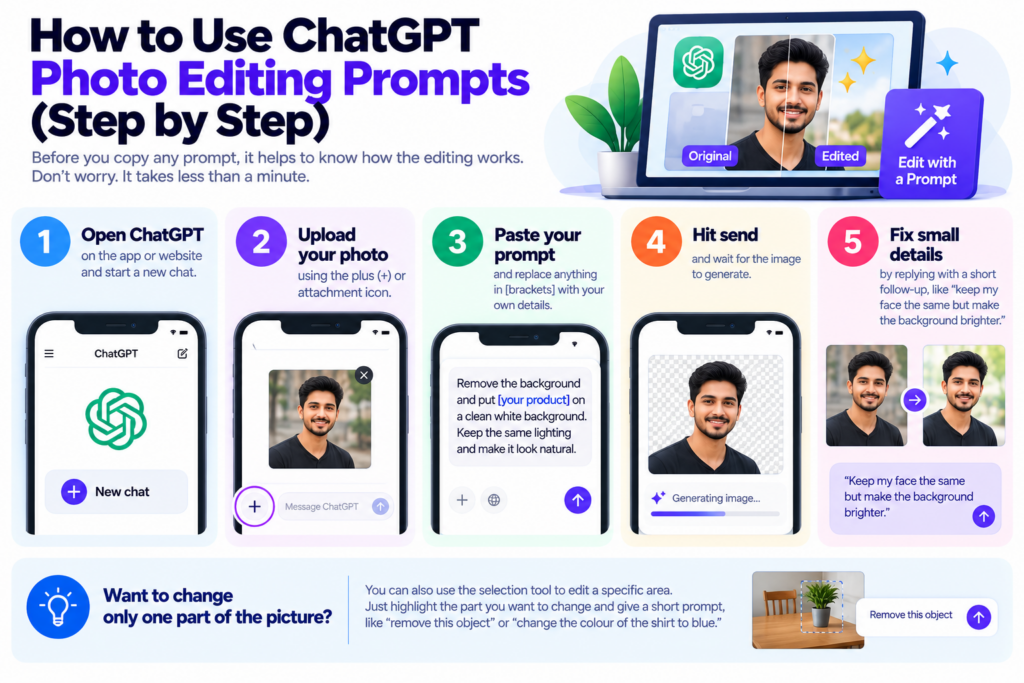
Want to change only one part of the picture? You can also use the select tool. Just highlight the area, like the sky or your shirt, and describe the change.
Free or paid: do you need ChatGPT Plus?
No, you can start for free. However, free users usually hit a daily image limit faster. If you create a lot of images, a paid plan gives you more room.
In India, many people tried the lower-cost ChatGPT Go plan through a free offer. If you’re one of them, check our guide on when the ChatGPT Go free plan ends in India so you don’t get surprised by a renewal charge.
Trending ChatGPT Photo Editing Prompts List (2026)
Here’s the fun part. We’ve grouped these AI photo editing prompts by trend, so you can jump straight to the style you want. Each one is copy-paste ready.
Quick tip: Always start with a clear, well-lit photo where your face is easy to see. A blurry selfie gives a blurry result, no matter how good the prompt is.
1. Action Figure and Chibi Toy Prompts
This is one of the most shared AI photo styles of 2026. It turns you into a collectible toy, often sealed in a shop-style box. Why is it so popular? Because it’s personal, funny and instantly shareable.
Boxed action figure:
Turn the person in this photo into a realistic 3D action figure inside a clear plastic toy box. Keep the face exactly the same. Add small accessories next to the figure: [laptop, coffee mug, cricket bat]. Print the name "[Your Name]" and the tagline "[Your Tagline]" on the box. Clean studio lighting, toy store shelf background.Cute chibi figure:
Create a chibi-style 3D figurine of the person in this photo with a big head and small body. Keep their hairstyle, outfit colours and facial features. Place it on a wooden desk next to a computer screen showing the 3D model. Soft natural light, high detail.Desk collectible with packaging:
Make a 1/7 scale collectible figure of the person in this photo standing on a round clear base. Put the printed box with their picture behind it. Keep the face and clothes accurate. Realistic product photography style.2. Vintage Film and “Anti-AI” Look Prompts
Funny enough, one of the biggest AI trends is making photos look less like AI. People want grain, light leaks and faded colours, just like an old film camera.
Film camera look:
Edit this photo to look like it was shot on 35mm film in the 1990s. Add soft grain, slightly faded colours, a warm light leak in one corner and gentle blur. Keep my face natural and unchanged.Polaroid memory:
Turn this photo into an old Polaroid print with a white border, slight colour shift and soft flash. Place it on a wooden table with a few other blurry Polaroids around it. Keep the people in the photo exactly as they are.Black and white classic:
Convert this photo into a high-contrast black and white portrait, like a classic film photo. Add fine grain and soft side lighting. Do not change the face or expression.3. Y2K Camcorder Prompts
The early 2000s are back. Think flash photos, timestamps and that fuzzy camcorder look.
Make this photo look like a still from a 2003 home video camcorder. Add a date stamp in the bottom right corner reading "[DD MM 2003]", slight VHS lines, a strong on-camera flash and low resolution. Keep my face recognisable.Recreate this photo as an early-2000s digital camera picture taken at night. Harsh flash, red-eye reduction glow, slightly washed-out skin and a dark background. Keep the same pose and face.4. Retro Bollywood and Time Travel Prompts
Ever wondered how you’d look in another era? These prompts place you in a different decade, with matching clothes and lighting.
Retro Bollywood poster:
Transform this photo into a 1970s Bollywood film poster. Hand-painted style, bold title text reading "[Film Name]", warm red and yellow tones, dramatic pose. Keep my face accurate. Add a small cast credit line at the bottom.Vintage saree portrait:
Create a vintage portrait of the woman in this photo wearing a [red chiffon] saree, in the style of a 1990s film still. Warm golden hour light, soft grain, a plain textured wall behind her. Keep her face and hair the same.Time travel series:
Show the person in this photo in the [1950s / 1980s / 2050s]. Change only the clothes, hairstyle, background and lighting to match the era. Keep the face, body shape and expression unchanged.5. Fake Movie Poster Prompts
Want to star in your own film? These prompts turn a regular portrait into a poster, complete with title and tagline.
Turn this photo into a cinematic action movie poster. Title: "[Movie Title]". Tagline: "[Tagline]". Dark, moody colours with orange highlights, city skyline in the background, and a release date at the bottom. Keep my face realistic.Make a romantic movie poster using this couple photo. Soft pink sunset, title "[Title]" in elegant font, and the line "Coming this [Month]". Keep both faces unchanged.6. Realistic Instagram Portrait Prompts
Not every edit needs to be wild. Sometimes you just want a clean, natural photo for your profile. These are the best AI prompts for realistic photos.
Professional headshot:
Turn this selfie into a professional LinkedIn headshot. Navy blazer, plain light grey background, soft studio lighting. Keep my face, skin tone and hairstyle exactly the same. Natural, not airbrushed.Golden hour portrait:
Edit this photo so it looks like it was taken during golden hour on a rooftop. Warm sunlight on one side of the face, soft blurred city behind me. Do not change my face or body.Rainy street look:
Place the person in this photo on a rainy street at night in Mumbai, holding a black umbrella. Neon reflections on the wet road, cinematic mood. Keep the face and outfit the same.Background swap only:
Remove the background of this photo and replace it with [a beach at sunset]. Match the lighting on my face to the new background. Do not edit anything else.7. Couple Photo Prompts
Couple edits are a huge part of the chatgpt photo editing prompts trending on Instagram. Upload one photo with both of you in it for the best result.
Turn this couple photo into a dreamy pre-wedding shoot in the hills of [Manali]. Soft mist, warm sunset, flowing outfits. Keep both faces exactly the same and their natural expressions.Recreate this couple photo as a 1990s romantic film scene. Light rain, a vintage car in the background, warm tones and slight film grain. Keep both faces unchanged.Make this couple photo look like a cozy indoor shot at a cafe. Fairy lights, two coffee cups on the table, soft focus background. Natural, realistic style.8. Family Photo Prompts
A family photo prompt for ChatGPT can turn a messy group selfie into something you’d actually frame.
Turn this family photo into a festive Diwali portrait. Traditional outfits, diyas and rangoli in front, warm glowing light. Keep every person's face and height the same.Make this family photo look like a professional studio portrait with a plain beige background and soft even lighting. Fix the posture slightly, but keep everyone recognisable.Create a cartoon-style illustration of this family for a wall poster. Bright colours, friendly expressions, and the text "[Family Name] Family" at the top.9. Scrapbook and Collage Prompts
Think of these like a digital diary page. They layer your photo with paper textures, doodles and handwritten notes.
Create a scrapbook page using this photo. Add torn paper edges, washi tape, small doodles, a handwritten note reading "[Your Note]" and a few dried flowers. Warm, cozy colours.Make a mood board collage around this portrait with 5 smaller matching images of [coffee, books, sunsets]. Beige and brown colour palette, soft shadows.10. Pet Prompts
Your pet deserves a glow-up too. These are some of the most fun AI photo prompts to try.
Imagine the pet in this photo as a human. Match its fur colour to the hair, its personality to the outfit, and keep a small hint of the pet in the face. Realistic portrait style.Turn my pet into a royal oil painting portrait. Velvet cape, gold frame, classic museum lighting.11. Product Photo Prompts for Small Sellers
Here’s where ChatGPT gets useful for business. If you sell online, you can turn a basic phone photo into a clean product shot.
Selling on marketplaces? These pair well with our guide on how to sell on Meesho and our list of the best ecommerce platforms in India.
Turn this product photo into a clean ecommerce image. Pure white background, soft shadow under the product, sharp focus. Do not change the product's shape, colour or label.Place this product on a [marble kitchen counter] with soft morning light and a few matching props. Lifestyle style for Instagram. Keep the product exactly the same.Create a festive sale banner using this product image. Add the text "[Diwali Sale: 30% Off]" in bold, with warm lights in the background.12. Old Photo Restoration Prompts
Got an old family photo with scratches and faded colours? ChatGPT can help bring it back to life.
Restore this old photo. Remove scratches, dust and creases, sharpen the details and fix the faded areas. Keep the faces exactly as they are. Do not add anything new.Colourise this black and white photo with natural, realistic colours that match the [1960s] era. Keep the faces and clothing details unchanged.How to Write Your Own AI Photo Editing Prompts
Copying prompts is a great start. But what happens when you want a style that isn’t on any list? That’s when it pays to know how a good prompt is built.
A simple prompt formula
Think of a prompt like ordering food. “Something tasty” gets you a random dish. “Paneer tikka, extra spicy, no onions” gets you exactly what you want.
Use this five-part formula:
- Action: What should ChatGPT do? (Turn, edit, restore, place)
- Subject: Who or what is in the photo?
- Style: What look are you going for? (Film, poster, chibi, studio)
- Details: Lighting, background, colours, props or text
- Guardrail: What must stay the same? (Usually your face)
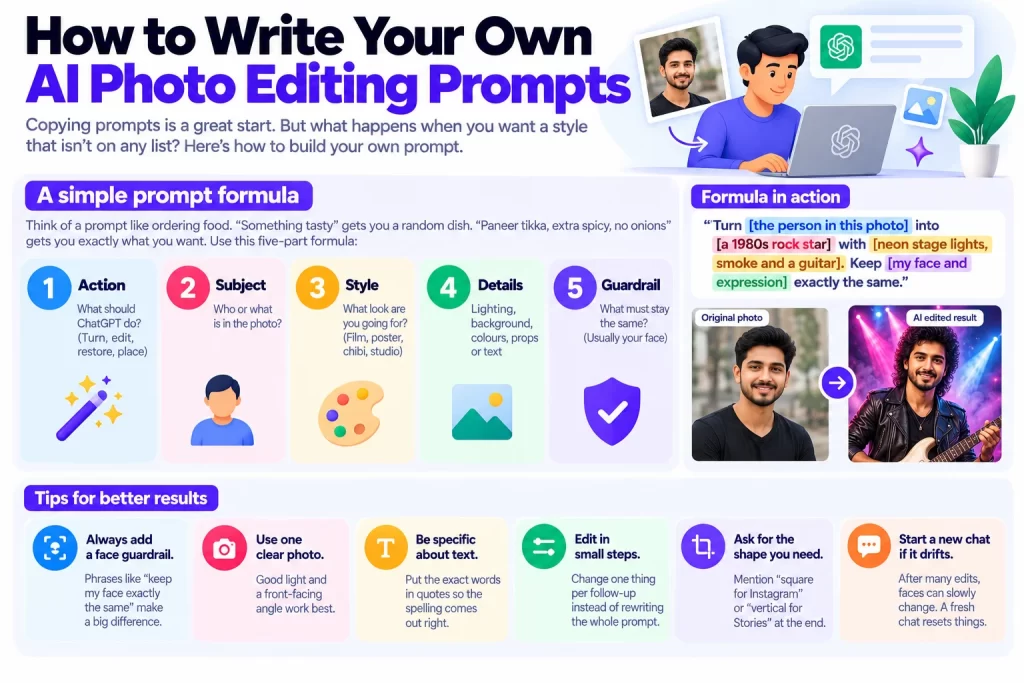
Here’s the formula in action:
Turn [the person in this photo] into [a 1980s rock star] with [neon stage lights, smoke and a guitar]. Keep [my face and expression] exactly the same.Tips for better results
- Always add a face guardrail. Phrases like “keep my face exactly the same” make a big difference.
- Use one clear photo. Good light and a front-facing angle work best.
- Be specific about text. Put the exact words in quotes so the spelling comes out right.
- Edit in small steps. Change one thing per follow-up instead of rewriting the whole prompt.
- Ask for the shape you need. Mention “square for Instagram” or “vertical for Stories” at the end.
- Start a new chat if it drifts. After many edits, faces can slowly change. A fresh chat resets things.
Can ChatGPT write the prompt for you?
Yes, and it’s a handy shortcut. Think of ChatGPT as its own photo prompt generator. Upload your picture and ask: “Write a detailed prompt to turn this into a vintage Bollywood poster.” Then paste the result back in and generate.
If you enjoy tools like this, browse our picks for the best AI tools for small business in India. And if you’d like to bring your edited photos to life, check out these open-source AI video generators.
Is It Safe to Upload Your Photos to ChatGPT?
Viral trends move fast. Still, it’s worth pausing for a second before you upload a personal photo to any AI tool.
Here are a few simple habits that keep you safer:
- Check your data settings. In ChatGPT, go to Settings, then Data Controls, and choose whether your chats can be used to improve the model.
- Avoid sensitive details. Crop out ID cards, house numbers, car plates and school logos before uploading.
- Be careful with kids’ photos. Think twice before sharing images of children, even in a fun edit.
- Ask before editing others. Get a friend’s okay before you turn their photo into a meme or poster.
- Watch out for fake prompt sites. Some pages ask you to log in or download an app to “unlock” prompts. You don’t need any of that. Prompts are just text.
Also, remember that AI edits can look very real. So avoid creating images that could mislead people, like fake news photos or edits of public figures.
Final Thoughts: Your Next Viral Photo Is One Prompt Away
Viral AI photos aren’t magic. They come from a clear photo, a well-written prompt and a little patience with follow-up edits.
Let’s recap what you learned:
- ChatGPT can edit your photos for free, and paid plans simply give you more images.
- The hottest 2026 trends include action figures, vintage film looks, Y2K camcorder shots, retro Bollywood posters and scrapbook collages.
- Couple, family, pet and product prompts work just as well as selfies.
- The five-part formula (action, subject, style, details, guardrail) helps you write your own prompts.
- A face guardrail is the single best way to keep the result looking like you.
Now it’s your turn. Pick one prompt from this list, upload your favourite selfie, and see what ChatGPT creates. Then tweak it until it feels right.
Bookmark this page, because we update these trending ChatGPT prompts every month as new styles go viral. And if you use these edits for your brand, our list of the best marketing software for small business in India can help you share them further.
Frequently Asked Questions
The most popular ones turn you into an action figure, add a vintage film look, recreate a Y2K camcorder shot or place you in a retro Bollywood poster. Realistic headshot and background swap prompts are also widely used for profile pictures.
Right on this page. Every prompt above is written as plain text, so you can copy it, paste it into ChatGPT and replace the details in brackets. No app or login is needed to use them.
Yes. ChatGPT Images is available on the free plan. Free users have lower daily limits, so if you create many images, a paid plan gives you more generations.
Use a clear, front-facing photo and add a line like “keep my face exactly the same” to every prompt. Edit in small steps, and start a new chat if your face begins to change after many edits.
For Instagram, try the vintage film look, the golden hour portrait or a couple edit. Add “square format” for posts or “vertical format” for Stories and Reels, so the image fits without cropping.
Forbetcz CZ-bonus za vklad, http://robowealth24.com/2026/08/09/prehled-a-vyhody-sportovniho-sazeni-na-forbetcz-cz/ предлагает отличные возможности для игроков. Каждый пользователи могут воспользоваться щедрыми подарками, которые увеличивают шансы на выигрыш. Забудьте возможность приобрести дополнительные средства на ваш счет. Ставьте с умом и накапливайте призы!