



You paste a Hindi script into a free tool. You hit play. Then a flat, robotic voice stumbles over the second sentence. Sound familiar?
- Quick Picks: Which Free Hindi TTS Should You Try?
- What Makes a Hindi Text to Speech Voice Sound Natural?
- How to Judge a Free Hindi TTS Tool in 5 Checks
- The 7 Best Free Text to Speech Hindi Tools (2026)
- Free vs Paid Hindi Voice Generators: When Should You Upgrade?
- Can You Use AI Hindi Voices on YouTube and Reels?
- How to Make Hindi Text to Speech Sound More Human
- Fixing Common Hindi TTS Problems
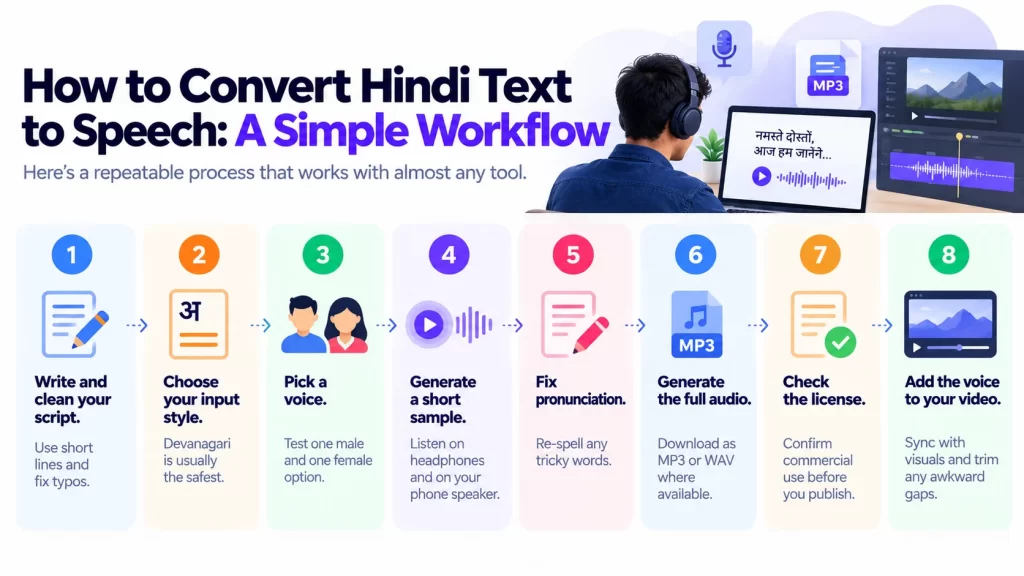
- How to Convert Hindi Text to Speech: A Simple Workflow
- Where Else Can You Use Hindi Text to Speech?
- Conclusion: Pick a Tool, Test It, Then Decide
- Frequently Asked Questions
Plenty of creators, teachers and small business owners hit this wall. The good news is that free Hindi voices have improved a lot. The catch is that “free” often hides limits on characters, downloads and commercial use.
This guide compares seven free tools for text to speech Hindi. You’ll see what each does well, where each one trips you up, and what the free plan really allows. You’ll also learn how to make AI Hindi sound more human, how to fix common problems, and whether you can use these voices on YouTube.


A quick note before we start: free limits change often. Treat the numbers below as a snapshot and check each tool’s current terms before you build a workflow around it.
Quick Picks: Which Free Hindi TTS Should You Try?
Short on time? Start here.
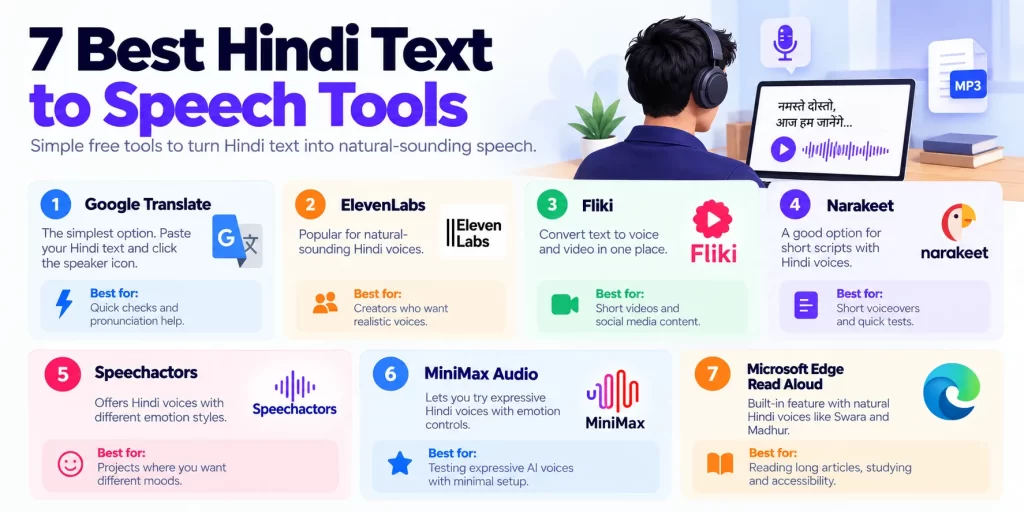
| Tool | Best for | Free plan snapshot | Commercial use? |
|---|---|---|---|
| Google Translate | Quick listening and pronunciation checks | Free, no sign-up | Not designed for it |
| ElevenLabs (free tier) | Most natural-sounding Hindi | Monthly credits, then paid | Check current terms |
| Fliki | Video creators who want voice plus visuals | Free tier available | Check current terms |
| Narakeet | Short scripts with a few voice options | Small free character allowance | Check current terms |
| Speechactors | Voice styles and emotions | Free plan, marketed as generous | Check current terms |
| MiniMax Audio | Trying expressive voices quickly | A few free trials, more after login | Check current terms |
| Microsoft Edge / Azure voices | Reading aloud in the browser | Free in Edge | Check terms for Azure |
That “Commercial use?” column matters more than most people think. We’ll come back to it.


What Makes a Hindi Text to Speech Voice Sound Natural?
Think of a good Hindi voice like a good news anchor. The words are clear, the pauses fall in the right places, and the tone fits the message.
A robotic voice usually gets one of these things wrong:
Highly Related

- Pronunciation. Names, English words in Hindi sentences and numbers often trip it up.
- Rhythm. Pauses land in odd spots, so sentences sound chopped.
- Emphasis. Every word gets the same weight.
- Emotion. A sad line sounds as cheerful as a sales pitch.
Even the best tools aren’t perfect here. One creator-focused guide notes that Hindi emotional range on ElevenLabs is still slightly behind English. So set realistic expectations, and always listen before you publish.
How to Judge a Free Hindi TTS Tool in 5 Checks
Before you pick a tool, run it through this short checklist.
- Voice quality. Play a 30-second sample. Does it sound like a person reading, or a machine?
- Free limits. Count characters, credits, minutes or trials. These vary widely.
- Download options. Can you save an MP3 or WAV file for free?
- Commercial rights. Can you use the audio in monetized videos, ads or client work?
- Input support. Does it handle Devanagari text, Hinglish (Hindi typed in English letters) and mixed Hindi-English sentences?
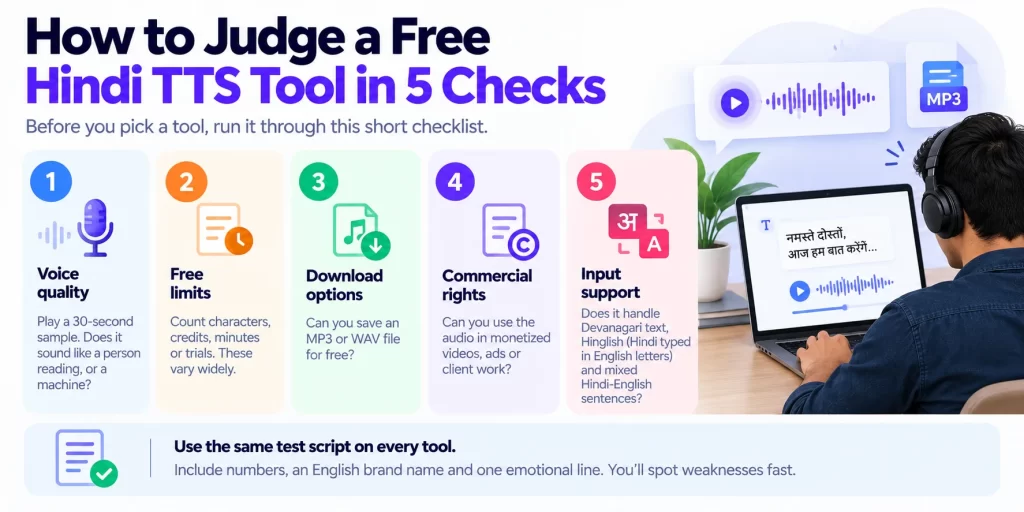
Use the same test script on every tool. Include numbers, an English brand name and one emotional line. You’ll spot weaknesses fast.
The 7 Best Free Text to Speech Hindi Tools (2026)
Here’s how the seven tools compare. This list draws on published tool pages and recent reviews, so run your own listening test too.
1. Google Translate (Google’s built-in voice)
This is the simplest option. Open Google Translate, choose Hindi, paste your text and click the speaker icon. Google’s voice quality is generally very good, though Google Translate offers no voice customization.
Best for: Quick checks, student reading practice and testing how a word should sound.
Free limit: No sign-up needed. Long passages may be awkward to handle.
Watch out for: No pitch, speed styles or emotion controls. It also isn’t built as a creator tool, so downloading clean audio takes extra effort.
Think of it as a pocket dictionary with a voice. Great for a fast check, not for a polished voiceover.
2. ElevenLabs (free tier)
ElevenLabs is the name Indian creators mention most when they want natural Hindi. One 2026 India-focused guide says the Hindi faceless niche, including true crime, mythology and biographies, leans heavily on ElevenLabs audio.
Best for: The most human-sounding Hindi among the free options.
Free limit: The free plan gives 10,000 credits a month. That’s roughly ten minutes of multilingual speech, according to one review.
Watch out for: Commercial rights. A review that read ElevenLabs’ pricing page on 10 October 2026 says the free plan has no commercial license. An older May 2026 guide described free use with attribution, so the sources disagree. Read ElevenLabs’ current terms before you monetize anything.
The Starter plan, at $5 a month, adds a commercial license and instant voice cloning. If you run a YouTube channel, that’s the upgrade path to consider.
For a plain-English walkthrough of what the free plan includes, see this ElevenLabs free-plan breakdown.
3. Fliki
Fliki is handy when you want voice and video in one place. Its Hindi page lists voices such as Aarghav, Ananya and Kajal. It says you can customize the voiceover with emotions and download audio in MP3 or WAV format.
Best for: Creators turning scripts into short videos.
Free limit: Fliki offers a free tier for exploring text to voice and text to video. Exact limits change, so check the pricing page.
Watch out for: Free exports may carry restrictions such as watermarks or time caps. Test one short video first.
If you make Reels and Shorts, this saves time. You write once and get audio and visuals together.
4. Narakeet
Narakeet suits short scripts. A comparison page describes it as offering seven Hindi male and female voices and 3,500 free characters. That page is written by a competing tool, so confirm the numbers yourself.
Best for: Short voiceovers, intros and quick tests.
Free limit: A small character allowance, which disappears fast on longer scripts.
Watch out for: 3,500 characters is only a few paragraphs of Hindi. Plan to split longer scripts or upgrade.
Think of the free plan as a sample size. It shows you the quality before you pay.
5. Speechactors
Speechactors markets itself as a generous free option. Its Hindi page promotes unlimited free use for Hindi text to speech in 2026. A separate comparison says it offers two human-like Hindi voices with voice styles on a $0 plan. Its own page also highlights emotion settings, with users praising more than ten emotional styles such as calm, angry and excited.
Best for: Short projects where you want different moods.
Free limit: Marketed as unlimited, but read the fine print on voices, downloads and commercial use.
Watch out for: The “unlimited” claim comes from the vendor. Test a long script and check the download quality.
6. MiniMax Audio
MiniMax offers a fast way to hear expressive Hindi voices. Its landing page gives five free conversions before you need to log in, with emotion switching, voice changing and downloads available after login. It also advertises voice cloning from as little as ten seconds of audio.
Best for: Hearing how expressive AI Hindi can sound without a long setup.
Free limit: A handful of trial conversions, then an account.
Watch out for: Trial credits run out quickly. Use them on your toughest script to see the real quality.
7. Microsoft Edge Read Aloud (and Azure voices)
Edge has a built-in Read Aloud feature with Hindi voices. A Hindi TTS comparison names Swara (female) and Madhur (male) as two natural-sounding Hindi voices available through Microsoft-powered tools. They’re a solid option for reading web pages, articles and documents aloud.
Best for: Accessibility, studying and listening to long articles.
Free limit: Free in the browser. Azure’s developer service has separate pricing and terms.
Watch out for: Read Aloud is built for listening, not for exporting finished voiceovers. If you need audio files for commercial use, review Microsoft’s terms first.
Bonus for developers: Sarvam AI
Building an app, IVR or voice bot? Look at Sarvam. Its documentation says its Bulbul v3 text-to-speech model supports 11 languages, 10 Indian languages plus English. Hindi is included. It’s API-first, so it suits builders more than casual users. Read the Sarvam models overview for current language support and options.
Free vs Paid Hindi Voice Generators: When Should You Upgrade?
Free tools are great for testing. But there comes a point when paying makes sense.
Stay free if:
- You’re a student or teacher making practice audio.
- You only need a few minutes of audio a month.
- Your project is personal, not monetized.
Upgrade if:
- You publish monetized YouTube videos or run ads.
- You need a commercial license in writing.
- You produce long scripts every week.
- You want voice cloning or tighter quality control.
Here’s a useful way to think about it. A free tool is like a trial gym pass. It’s fine for a week. If you’re showing up daily, you need a membership.
Free offers also change. Plans end, trial periods expire and limits shrink. We’ve seen this with other AI subscriptions, and our guides on the ChatGPT Go free year ending and the expired Airtel Perplexity Pro offer show how quietly a “free” deal can turn into a charge. Set a calendar reminder for any trial.
Can You Use AI Hindi Voices on YouTube and Reels?
This is the question that causes the most trouble. Let’s keep it simple.
Check the license first
“Free to use” and “free to monetize” are different things. Some free plans block commercial use entirely. Others require attribution, meaning you must credit the tool in your description.
Before you upload, ask:
- Does the free plan allow monetized videos?
- Do I need to credit the tool?
- Does the license cover client work and ads?
If the answer is unclear, assume the safer option and use a plan that grants a commercial license in writing.
Be honest with your audience
Many platforms ask creators to disclose synthetic or altered content in some situations. Rules change, so read the current policies of YouTube and Instagram. Beyond rules, a short line like “Voiceover created with AI” builds trust.
Be careful with voice cloning
Cloning your own voice is one thing. Cloning someone else’s is risky. Get consent, and don’t imitate a celebrity or a real person without permission.
If you build videos from scratch, our guide to the best open-source AI video generators pairs well with a Hindi voice tool.
How to Make Hindi Text to Speech Sound More Human
A few small edits can change the result more than switching tools. Try these.
Write for the ear, not the eye
- Use short sentences.
- Replace complex words with simpler ones.
- Read your script aloud first. If you stumble, the AI will too.
Use punctuation as a pause button
- Add commas where a person would breathe.
- Use full stops to create clear breaks.
- Split long paragraphs into shorter ones.
Spell tricky words the way they sound
Brand names and English words often come out wrong. Try writing them in Devanagari, or spell them phonetically. For example, if a tool mangles a brand name, type it the way you’d say it in Hindi.
Test Hinglish carefully
Some tools handle Hindi in English letters, like “aap kaise hain,” better than others. Sentences that mix Hindi and English words can also confuse them. Test a few lines before committing a full script.
Match speed and tone
- Slow the voice a little for tutorials and e-learning.
- Use a livelier tone for ads and Reels.
- Pick a calm voice for audiobooks and long listening.
Record a short human intro
Mixing a few seconds of your own voice with an AI voice can make a video feel more personal. It’s a simple trick that many creators use.
Fixing Common Hindi TTS Problems
The voice sounds robotic. Shorten your sentences, add pauses and try another voice from the same tool. Then compare with a different tool.
Words are pronounced wrong. Switch the spelling between Devanagari and Roman letters. Add a space or hyphen to split difficult words.
Numbers sound strange. Write numbers out as words, such as “पाँच सौ” instead of “500,” and compare.
It doesn’t recognise Hinglish. Convert the whole script to Devanagari for a cleaner result.
Text to speech isn’t working. Check your browser, clear the cache, test another browser and try a smaller chunk of text. If it still fails, look for a character limit or a daily cap.
The free plan stopped early. You probably hit a character or credit limit. Split the script into smaller pieces, or wait for the monthly reset.
How to Convert Hindi Text to Speech: A Simple Workflow
Here’s a repeatable process that works with almost any tool.
- Write and clean your script. Use short lines and fix typos.
- Choose your input style. Devanagari is usually the safest.
- Pick a voice. Test one male and one female option.
- Generate a short sample. Listen on headphones and on your phone speaker.
- Fix pronunciation. Re-spell any tricky words.
- Generate the full audio. Download as MP3 or WAV where available.
- Check the license. Confirm commercial use before you publish.
- Add the voice to your video. Sync with visuals and trim any awkward gaps.
Once your video is live, don’t forget the title and description. Our guide to the best SEO tools for small businesses in 2026 can help you find the right keywords. Making thumbnails too? Check our collection of ChatGPT photo editing prompts for ideas.
Where Else Can You Use Hindi Text to Speech?
Voiceovers are only the start. Here are other practical uses.
- E-learning and school content. Turn lessons into audio for students.
- Audiobooks and podcasts. Convert written stories into listening content.
- Ads and promos. Produce quick voice drafts before hiring a voice artist.
- Accessibility. Help people who find reading hard or have low vision.
- IVR and WhatsApp voice messages. Create clear customer prompts and updates.
Running a small business? Voice can slot into your wider marketing mix. Our roundup of AI tools for small business in India and our guide to marketing software for small businesses show how voice fits alongside email, ads and automation.
Conclusion: Pick a Tool, Test It, Then Decide
Good text to speech Hindi is now easy to find, and many options are free. But free plans differ a lot in quality, limits and licensing.
Here’s the short version:
- For the most natural Hindi, try ElevenLabs first, and read its commercial terms.
- For quick checks, use Google Translate or Edge Read Aloud.
- For videos, look at Fliki.
- For small tests and different moods, try Narakeet, Speechactors or MiniMax.
- For developers, explore Sarvam.
- Before monetizing, confirm the license in writing.
Your next step takes five minutes. Write a 100-word Hindi script with one number and one English brand name. Run it through three tools from this list. Pick the voice you’d actually trust to represent your brand.
Found a tool that surprised you? Bookmark this guide, share it with a fellow creator, and come back when you’re ready to compare paid plans.
Frequently Asked Questions
It depends on your goal. For naturalness, many creators point to ElevenLabs’ free tier. For quick, no-sign-up checks, Google Translate works. For video projects, Fliki is convenient. Test your own script on two or three tools before choosing.
Some tools allow it. Fliki’s Hindi page mentions MP3 and WAV downloads, and MiniMax offers downloads after login. Others limit downloads on free plans. Check each tool’s current terms.
Not always. Some free plans exclude commercial use, and others require attribution. A review of ElevenLabs’ pricing page from October 2026 says its free plan has no commercial license. Read the current terms, and upgrade if you need written commercial rights.
Write short sentences, add commas and full stops for pauses, and spell difficult words phonetically. Try both Devanagari and Roman script. Slow the speed slightly for tutorials, and test more than one voice.
Some tools handle it well, and others struggle. Mixed Hindi and English sentences are the hardest. If you get odd results, convert the script into Devanagari, or spell English words the way you’d say them in Hindi. Sarvam markets its voice stack for code-mixed speech, so developers may want to test it.