



Last updated: 15 October 2026. Fees and rules are taken from Meesho’s supplier site and 2026 seller guides. Always confirm current charges in your own Supplier Panel.
- What Is Meesho, and Why Do Sellers Choose It?
- Before You Start: Documents You Need
- How to Sell on Meesho Without GST
- How to Sell on Meesho: Step-by-Step Guide
- What Should You Sell on Meesho?
- Meesho Seller Charges: What Does It Really Cost?
- Returns, RTO and Penalties Explained
- Common Meesho Seller Problems (and How to Fix Them)
- Meesho vs Flipkart vs Amazon: Which Is Best for New Sellers?
- How to Grow Your Meesho Business
- Conclusion: Start Small, Learn Fast, Then Scale
- Frequently Asked Questions
Meesho in 2026 at a glance
- Commission: 0% on all categories
- Registration and listing: Free
- GST: Optional. Without GST, you can sell within your own state using an Enrolment ID
- Payment: About 7 days after delivery, including COD orders
- Catalog approval: Usually live within 72 hours of upload
- Main costs: Shipping, return charges and penalties, not commission
Want to start an online business from home, but don’t have a big budget, a warehouse or even a GST number?
You’re not alone. Every month, thousands of people in India search for how to sell on Meesho. Homemakers, small shop owners, students and wholesalers all want the same thing: a simple way to reach buyers across the country without paying heavy fees.


Meesho is one of the easiest places to begin. It charges no commission, lets you sign up free, and even allows sellers without GST to start (with some limits).
But “easy to start” isn’t the same as “easy to profit.” Returns, shipping costs and penalties can quietly eat your margin if you don’t plan ahead.
In this guide, you’ll learn:


- What you need before you register
- How to sell on Meesho with or without GST
- A clear, 7-step process to create your seller account and get your first order
- What Meesho really costs you, with a worked profit example
- How to handle returns, RTO and penalties
- Whether Meesho, Flipkart or Amazon suits you best
Let’s get started.
What Is Meesho, and Why Do Sellers Choose It?
Meesho is an Indian online marketplace focused on value shoppers, especially in smaller towns and cities. Buyers come for low prices on clothing, home goods, accessories and everyday items.


For sellers, the big draw is simple: Meesho charges 0% commission on every category, according to its official supplier page. On most other marketplaces, a slice of every sale goes to the platform. On Meesho, you mainly pay for shipping and any returns.
Supplier vs reseller: which one are you?
People often mix these up, so let’s clear it up.
- Supplier (seller): You own or source the products, list them on Meesho, and ship orders. This guide is for you.
- Reseller: You share other sellers’ Meesho products on WhatsApp or Instagram and add your own margin. You don’t hold stock.
If you searched “how to resell in Meesho”, the reseller route is different and works through the Meesho app. Here, we focus on becoming a supplier, which is how you build a real business.
Before You Start: Documents You Need
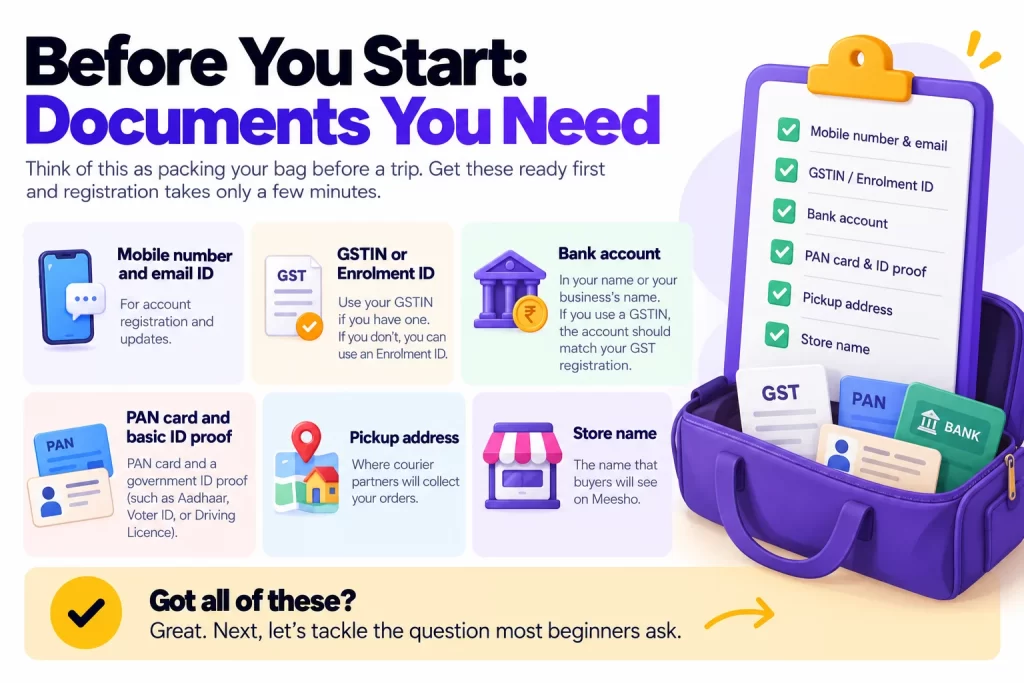
Think of this as packing your bag before a trip. Get these ready first and registration takes only a few minutes.
- Mobile number and email ID
- GSTIN (if you have one) or an Enrolment ID (if you don’t)
- Bank account in your name or your business’s name. If you use a GSTIN, the account should match that GST registration.
- PAN card and basic ID proof
- Pickup address where courier partners will collect orders
- Store name that buyers will see
Got all of these? Great. Next, let’s tackle the question most beginners ask.
How to Sell on Meesho Without GST
This is the biggest worry for new sellers. Good news: you can sell on Meesho without a regular GST number.
Since October 2023, Meesho has allowed small sellers to register with an Enrolment ID (also called UIN) instead of a GSTIN. This follows a change in GST rules that lets small businesses sell through online marketplaces without full GST registration.
Meesho par bina GST ke kaise bechein (the simple version)
- Visit the official GST portal and apply for an Enrolment ID for unregistered persons using your PAN.
- Keep your bank details and address proof handy.
- On Meesho’s registration page, choose the non-GST option and enter your Enrolment ID instead of a GSTIN.
- Complete the rest of the steps as normal.
The exact screens on the GST portal can change, so follow the latest on-screen instructions or ask a tax professional if you get stuck.
GST vs no GST: what’s the difference?
| Without GST (Enrolment ID) | Composition GST | Regular GSTIN | |
|---|---|---|---|
| Where you can sell | Only within your state | Only within your state | Anywhere in India |
| Annual turnover limit | Up to ₹40 lakh (₹20 lakh in some north-eastern states) | Up to ₹1.5 crore | No limit |
| Input tax credit | No | No | Yes |
| Best for | Testing the waters | Small, growing sellers | Serious, scaling sellers |
Limits as reported by 2026 seller guides. Check current GST rules before you decide.
Here’s the catch. Without GST, you can only ship to buyers in your own state. If you live in a big state like Uttar Pradesh or Maharashtra, that’s still millions of customers. But if your products have national demand, a regular GSTIN opens far more orders.
A smart path for many beginners? Start without GST, learn what sells, then register for GST once orders grow.
How to Sell on Meesho: Step-by-Step Guide
Now for the main event. Here’s how to create your Meesho seller account and go live.
Step 1: Sign up on the Meesho Supplier Panel
Go to supplier.meesho.com or download the Meesho Supplier app. Click “Start Selling” and register with your mobile number. You’ll get an OTP to verify it.
Step 2: Enter your GST or Enrolment ID details
Choose whether you have a GSTIN or an Enrolment ID. Enter the number exactly as it appears on your documents. A single typo can delay approval.
Step 3: Add your pickup address
This is where Meesho’s courier partners will collect your parcels. Use an address where someone is available during working hours. Missed pickups lead to late dispatch, which can cost you.
Step 4: Add your bank details
Enter your account number and IFSC code. Meesho will verify the account before it can send you payments. Double-check the name matches your registration.
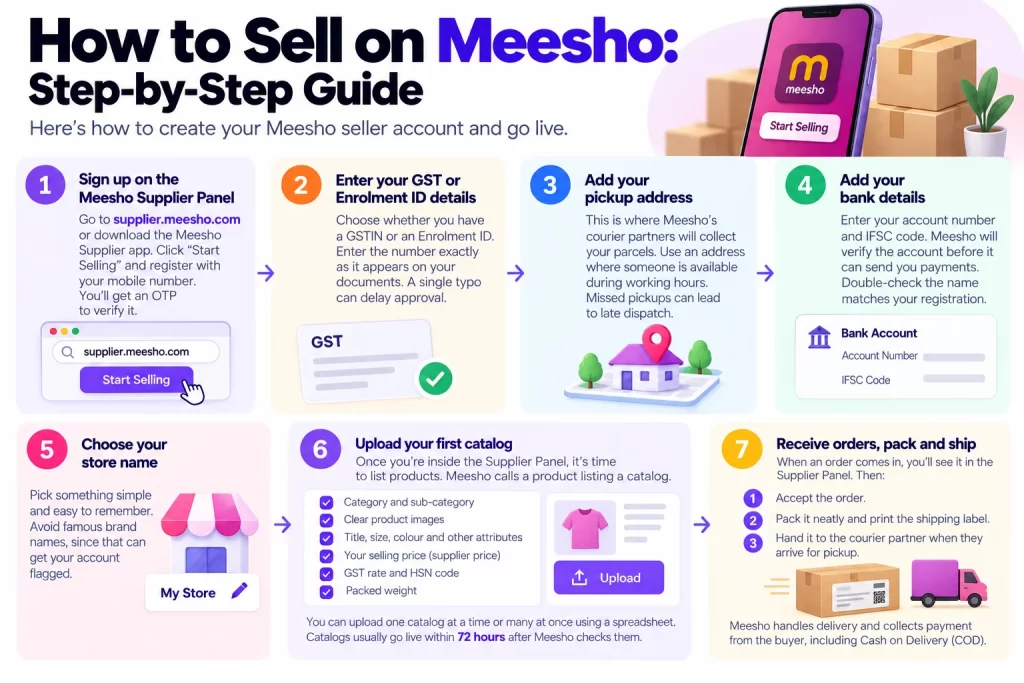
Step 5: Choose your store name
Pick something simple and easy to remember. Avoid famous brand names, since that can get your account flagged.
Step 6: Upload your first catalog
Once you’re inside the Supplier Panel, it’s time to list products. Meesho calls a product listing a catalog.
For each product, you’ll add:
- Category and sub-category
- Clear product images
- Title, size, colour and other attributes
- Your selling price (Meesho calls it the supplier price)
- GST rate and HSN code
- Packed weight
You can upload one catalog at a time or many at once using a spreadsheet. Catalogs usually go live within 72 hours after Meesho checks them.
Step 7: Receive orders, pack and ship
When an order comes in, you’ll see it in the Supplier Panel. Then:
- Accept the order.
- Pack it neatly and print the shipping label.
- Hand it to the courier partner when they arrive for pickup.
That’s it. Meesho handles delivery and collects payment from the buyer, including Cash on Delivery orders.
Tips for catalogs that actually sell
Getting listed is easy. Getting noticed takes more effort. Keep these tips in mind:
- Use clean images. A plain background works best. Watermarks and text on images often get rejected.
- Fill every attribute. Missing details can lead to rejection and lower visibility.
- Keep titles short and clear. “Women’s Cotton Printed Kurti, Blue” beats a long list of keywords.
- Declare the correct packed weight. Under-declaring triggers weight-discrepancy charges later.
- Upload several catalogs early. Seller guides suggest starting with 5 to 7 catalogs so Meesho’s system has more to test.
Want help writing product titles and descriptions faster? AI writing tools can draft them in seconds. Our guide to the best AI tools for small business in India covers free options that work well for this.
What Should You Sell on Meesho?
Searches for “best selling products on Meesho” are popular for a reason. Picking the right product matters more than almost anything else.
Meesho’s buyers are price-conscious. So products that are affordable, light and easy to ship usually do best.
Popular categories include:
- Women’s ethnic wear: Kurtis, sarees, dupattas and suit sets
- Fashion accessories: Jewellery, hair accessories, bags
- Home and kitchen: Storage boxes, bedsheets, kitchen tools
- Kids’ clothing and toys
- Beauty and personal care (check category rules first)
How to choose your first product
Ask yourself three quick questions:
- Can I source it cheaply and reliably? Local wholesale markets are a great start.
- Is it light and hard to damage? Heavy or fragile items mean higher shipping and more returns.
- Is the size simple? Free-size items get fewer “doesn’t fit” returns than sized clothing.
Before you commit, check what people actually search for. A free tool like the Semrush free plan can show search demand for product ideas in India.
Meesho Seller Charges: What Does It Really Cost?
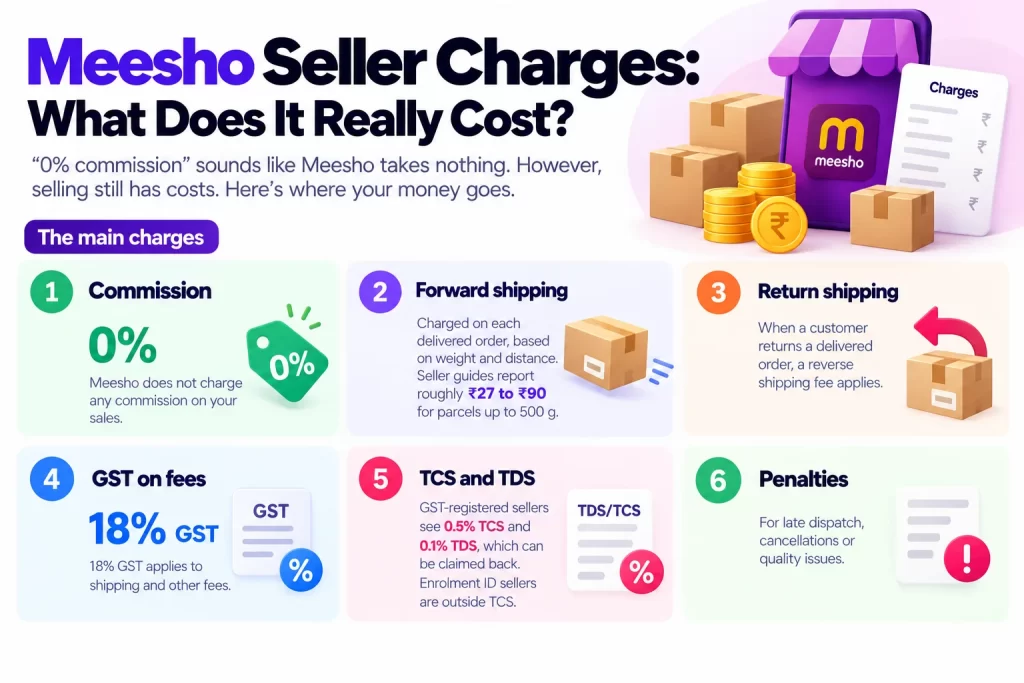
“0% commission” sounds like Meesho takes nothing. However, selling still has costs. Here’s where your money goes.
The main charges
- Commission: 0%
- Forward shipping: Charged on each delivered order, based on weight and distance. Seller guides report roughly ₹27 to ₹90 for parcels up to 500 g.
- Return shipping: When a customer returns a delivered order, a reverse shipping fee applies.
- GST on fees: 18% GST applies to shipping and other fees.
- TCS and TDS: GST-registered sellers see 0.5% TCS and 0.1% TDS, which can be claimed back. Enrolment ID sellers are outside TCS.
- Penalties: For late dispatch, cancellations or quality issues.
When do you get paid?
Meesho pays sellers 7 days after an order is delivered, according to its supplier page. This includes Cash on Delivery orders. Any return or penalty adjustments may show up in a later payment cycle.
A real profit example
Let’s make this concrete. Imagine you sell a cotton kurti.
| Item | Amount |
|---|---|
| Your supplier price | ₹349 |
| Shipping (regional) | about ₹65 |
| GST on shipping | about ₹12 |
| You receive per delivered order | about ₹272 |
Example based on a 2026 seller guide. Your actual shipping depends on weight and zone.
Now subtract what the kurti cost you, plus packaging. If it cost ₹180 and packaging is ₹10, you keep about ₹82 per delivered order.
Sounds good, right? But here’s the twist. If 2 out of every 10 buyers return the kurti, you pay return shipping on those and may not resell some items. Your average profit can drop sharply.
The lesson is clear: returns, not commission, decide your profit on Meesho. Always build your expected return rate into your price.
Returns, RTO and Penalties Explained
This is where many new sellers lose money. Let’s break down each one.
What is RTO on Meesho?
RTO (Return to Origin) happens when a parcel can’t be delivered and comes back to you. This usually happens when the buyer refuses a COD order or isn’t reachable.
Seller guides report that Meesho doesn’t charge a reverse fee for RTO. Even so, you still lose packaging costs and time, and your stock is stuck in transit.
Customer returns
A customer return happens after delivery, when the buyer sends the product back. These carry a reverse shipping fee. Seller guides quote anywhere from about ₹30 to over ₹150, depending on the parcel and category.
Penalties to avoid
Meesho may charge penalties for:
- Late dispatch: Not handing over orders on time
- Seller cancellations: Cancelling orders after accepting them
- Quality issues: Wrong, damaged or poor-quality products
- Weight mismatch: Declaring a lower weight than the actual parcel
Penalty amounts can change, so check the latest figures in your Supplier Panel.
Common Meesho Seller Problems (and How to Fix Them)
Running into trouble? Use this quick table to find the cause and the fix.
| Problem | Likely cause | What to do |
|---|---|---|
| Catalog rejected | Watermarked images, missing details, or price mismatch | Use plain images, fill every field, and price sensibly for the category |
| No orders after listing | Too few catalogs or weak images | Upload more catalogs, improve photos, and test lower prices |
| High return rate | Wrong sizes, misleading images, or poor quality | Add size charts, show real product photos, and check quality before packing |
| Extra shipping charges | Packed weight declared too low | Weigh the packed parcel and update the weight in your catalog |
| Payment seems delayed | Payment cycle is 7 days after delivery, not after dispatch | Check the delivery date in your Supplier Panel payments section |
| Account blocked or restricted | Repeated quality complaints, cancellations, or using brand names you don’t own | Contact Meesho supplier support, fix the issue, and avoid copied brand listings |
| Lots of RTO on COD orders | Buyers ordering on impulse | Price fairly, use honest images, and ship quickly so buyers don’t lose interest |
Meesho vs Flipkart vs Amazon: Which Is Best for New Sellers?
Meesho isn’t the only option. So how does it compare?
| Meesho | Flipkart | Amazon | |
|---|---|---|---|
| Commission | 0% | Varies by category | Varies by category |
| GST needed? | Optional (Enrolment ID allowed) | Usually required for most sellers | Usually required for most sellers |
| Typical buyer | Price-conscious, smaller towns | Broad, mass market | Broad, includes premium buyers |
| Best for | First-time and budget sellers | Sellers with GST and mid-range products | Sellers with branding and higher-priced products |
Fees and GST rules change often. Check each platform’s seller page for current terms.
So which should you choose?
- Choose Meesho if you’re just starting, have a small budget, or don’t have GST yet.
- Choose Flipkart or Amazon if you have GST, a brand, or products with higher prices and margins.
- Use more than one once you’re comfortable. Many sellers start on Meesho, then expand.
Thinking about your own online store later? Our guide to the best ecommerce platforms in India compares Shopify, WooCommerce and Indian options.
How to Grow Your Meesho Business
Once your first orders arrive, focus on these habits:
- Add new catalogs regularly. Fresh listings give Meesho more chances to show your products.
- Watch your return rate. If one product gets too many returns, fix it or remove it.
- Ship on time, every time. Fast dispatch protects your rating and avoids penalties.
- Track your real profit. Don’t just count orders. Count what’s left after shipping and returns.
- Promote outside Meesho. Share your catalogs on WhatsApp and Instagram. Tools from our list of the best marketing software for small businesses in India can help you schedule posts and messages.
Planning to build your own brand website down the line? The best SEO tools for small businesses can help it get found on Google, and Ahrefs Webmaster Tools can audit it for free.
Conclusion: Start Small, Learn Fast, Then Scale
Selling on Meesho is one of the simplest ways to start an online business in India in 2026. You don’t need a big investment, a warehouse, or even a GST number to begin.
Here’s a quick recap:
- Meesho charges 0% commission and registration is free.
- You can sell without GST using an Enrolment ID, but only within your state.
- Registration takes 7 simple steps, from signing up to shipping your first order.
- Payments arrive 7 days after delivery, including COD orders.
- Returns decide your profit, so price with them in mind.
- Avoid penalties by shipping on time and declaring the correct weight.
Your next step is easy. Pick one product you can source cheaply, gather your documents, and register on the Meesho Supplier Panel today. Upload a few catalogs, watch what sells, and grow from there.
Want more free tools to run your small business smarter? Explore our guide to the best AI tools for small business in India.
Frequently Asked Questions
Yes. You can register as a Meesho seller using an Enrolment ID (UIN) from the GST portal instead of a GSTIN. The main limit is that you can only sell to buyers within your own state, and your annual turnover must stay within the small-seller limit.
Yes. Meesho seller registration and catalog listing are free, and Meesho charges 0% commission. You still pay shipping on delivered orders, return shipping on customer returns, GST on fees, and any penalties.
Go to supplier.meesho.com or the Meesho Supplier app. Register with your mobile number, then add your GSTIN or Enrolment ID, pickup address, bank details and store name. After that, log in to the Supplier Panel and upload your first catalog.
Meesho pays sellers 7 days after an order is delivered, including Cash on Delivery orders. Payments go straight to your registered bank account. Return and penalty adjustments may appear in a later payment cycle.
RTO happens when a parcel can’t be delivered and comes back to you. Seller guides report no reverse fee for RTO. Customer returns after delivery do carry a reverse shipping fee, which varies by parcel weight and category. Check your Supplier Panel for current rates.