



You launched your Shopify store. The theme looks sharp and the products are ready. Then you open Google Analytics and see a trickle of organic visitors. Sound familiar?
- Agency or DIY? The Short Answer
- Why Shopify SEO Needs Its Own Playbook
- How Much Does Shopify SEO Cost in India?
- How to Choose a Shopify SEO Agency in India
- Best Shopify SEO Agencies in India to Shortlist (2026)
- DIY Shopify SEO Checklist (2026)
- Agency or DIY: Making the Final Call
- Conclusion: Your Next Step
- Frequently Asked Questions
This is when most Indian store owners start searching for a Shopify SEO agency. Others decide to roll up their sleeves and do it themselves. Both paths can work. Both can also waste months of effort and lakhs of rupees if you go in blind.
This guide covers both routes. You’ll learn what Shopify SEO costs in India, how to choose an agency without getting burned, and which agencies are worth shortlisting. You’ll also get a practical DIY checklist for 2026. Pick one path, or combine them.


Agency or DIY? The Short Answer
Let’s save you some scrolling. Here is a simple way to decide.
Go DIY if:
- Your store has under 100 products.
- You can spend three to five hours a week on SEO.
- Your marketing budget is tight, and you’d rather spend time than money.
Hire an agency if:


- You have a large catalogue or are migrating from another platform.
- You sell in a crowded niche like fashion, jewellery or supplements.
- You’re busy running operations and SEO keeps slipping to next month.
Try a hybrid if:
- You pay for a one-time audit, then fix the issues yourself.
- You hire a freelancer for technical work and write the content in-house.
The hybrid route is underrated. An audit costs far less than a monthly retainer, and it gives you a clear to-do list.


Why Shopify SEO Needs Its Own Playbook
Shopify is often called “SEO-friendly.” That’s partly true. The platform generates a sitemap automatically and handles HTTPS. It also adds canonical tags for you, which gives you a solid technical base.
But “SEO-friendly” isn’t the same as “SEO-ready.” Think of it like buying a flat with a good foundation. You still need to build the rooms.
Here are the problems that show up on Shopify stores again and again:
- Duplicate-looking URLs. The same product can load at /products/item and at /collections/name/products/item. Canonical tags usually sort this out, but your internal links need to point to the right version.
- Variant and filter URLs. When shoppers pick a colour or size, Shopify adds a parameter to the URL. Filters on collection pages create more URL versions. These can waste crawl budget if you ignore them.
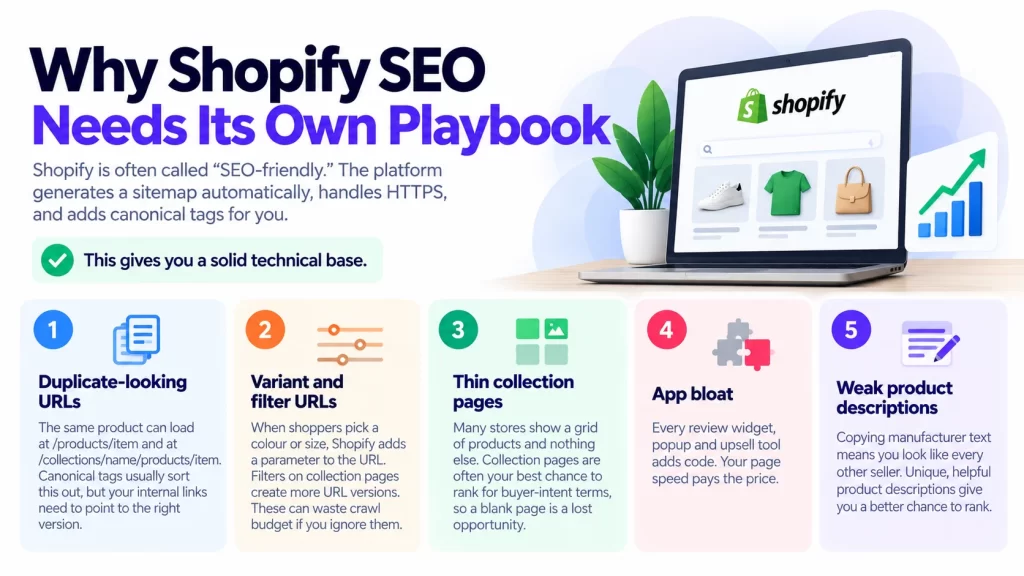
- Thin collection pages. Many stores show a grid of products and nothing else. Collection pages are often your best chance to rank for buyer-intent terms, so a blank page is a lost opportunity.
- App bloat. Every review widget, popup and upsell tool adds code. Your page speed pays the price.
- Weak product descriptions. Copying manufacturer text means you look like every other seller.
If you’re still choosing a platform, read our breakdown of the best ecommerce platforms in India. Already on Shopify? Keep reading.
How Much Does Shopify SEO Cost in India?
Pricing is all over the place. That’s the first thing you’ll notice when you request quotes.
Here’s what we found in current listings:
- Some marketplace listings advertise basic SEO from around ₹4,000 per month.
- One Indore agency quotes ₹8,000 to ₹70,000 per month for Shopify SEO, depending on competition and goals.
- A Mumbai agency’s pricing guide puts general SEO at ₹8,000 to ₹60,000+ per month.
- An ecommerce-focused agency says retainers typically run ₹35,000 to ₹2,50,000+ per month, with small stores starting around ₹35,000 to ₹75,000.
Keep one caveat in mind. These numbers are self-reported by agencies, so treat them as ranges, not promises.
What drives the price?
- Number of products and collections
- How competitive your niche is
- Whether content writing and link building are included
- Whether you need technical fixes, like theme edits or speed work
- Agency size and experience
What does each budget realistically buy?
- Under ₹10,000 per month: Usually basic on-page edits and a monthly report. Fine for a tiny store, but don’t expect fast growth.
- ₹15,000 to ₹50,000 per month: Technical fixes, collection and product page optimisation, and a few content pieces. This suits most small D2C brands.
- ₹50,000 and above: Larger catalogues, digital PR, custom content, and heavier technical work.
A good rule of thumb: be careful with very cheap, “guaranteed rankings” offers. Nobody controls Google. If a quote looks too good, ask exactly what you’ll receive each month.
How to Choose a Shopify SEO Agency in India
Picking an agency feels like hiring a contractor for your home. A glossy brochure tells you little. The finished work tells you everything.
Use these filters.
- Check Shopify-specific experience
General SEO skills help, but Shopify has quirks. Ask how they handle duplicate URLs, collection pages, Liquid theme edits and app bloat. If the answer is vague, move on.
- Ask for relevant case studies
You want stores like yours. A case study about a B2B software firm doesn’t tell you much about a jewellery brand. Ask for before-and-after traffic and revenue, not just rankings.
- Look at third-party reviews
Directories like Clutch’s India Shopify SEO list show verified reviews, team size and minimum project budgets. Read the written reviews, not just the star rating.
- Understand the deliverables
Get a written scope. It should state how many pages get optimised, how many articles get written, and what technical work is included. Ask what the monthly report contains.
- Confirm who actually does the work
Some agencies sell with senior people and hand the work to juniors. Ask who will manage your account and how often you’ll speak.
Questions to ask on the first call
- What would you fix first on my store, and why?
- How do you handle duplicate URLs and variant pages?
- How do you measure success: traffic, revenue, or both?
- What do you need from my team?
- How do you use AI tools, and who reviews the output?
Red flags to watch for
- Guaranteed #1 rankings. Nobody can promise that.
- No audit before the quote. They can’t price what they haven’t seen.
- Mystery backlinks. Bulk links from random sites can hurt you.
- Long lock-in contracts with no exit clause.
- Vague reports full of impressions but no sales data.
- No access to your accounts. You should own your Search Console and Analytics.
If you’d like to learn from independent practitioners before hiring, our list of top SEO experts in India is a handy starting point.
Best Shopify SEO Agencies in India to Shortlist (2026)
First, a transparency note. This is a shortlist, not a ranking. We haven’t audited these agencies’ work, and results vary by store and niche. Use the list to start your research, then run your own checks.
Agencies that appear often on review directories
- PageTraffic (New Delhi). Clutch lists it among its highly reviewed Shopify SEO companies in India, with a 4.9 out of 5 rating from 115 reviews (listing updated August 2026).
- EvenDigit. Also named on Clutch’s India Shopify SEO page.
- eSearch Logix. Another name on that same directory page.
- Elsner Technologies. Appears in the same Clutch roundup.
Agencies named in city-focused roundups
One Indian agency’s “Shopify SEO experts near me” article names several providers by region. It mentions SEO Discovery near Chandigarh, WebSpero Solutions near Mohali, and Savit Interactive and Capsicum Mediaworks near Mumbai. It also lists Prateeksha Web Design for Mumbai, PageTraffic for New Delhi, RankON Technologies for Lucknow, and Promotion Expert and OrangeMantra for Delhi-NCR and Gurgaon.
These are agency-written lists, so read them with a pinch of salt. They’re still useful for finding names to research.
How to verify any agency in 30 minutes
- Search for their name plus “reviews” and read both good and bad feedback.
- Check Clutch, Google Business Profile and LinkedIn.
- Visit two client stores they mention. Do those stores look healthy in search?
- Ask for a short sample audit of your own store.
- Request references and call one.
Does location matter?
Not as much as you’d think. Most Shopify SEO work happens remotely. Still, many stores like working in their own time zone and language. Clutch’s India directory shows plenty of providers beyond the metros, including Ahmedabad, Jaipur, Noida, Gurugram and Indore. If you want a “Shopify SEO agency in Mumbai” or “in Bangalore” for in-person meetings, fine. Otherwise, judge on skills and results.
DIY Shopify SEO Checklist (2026)
Ready to do it yourself? Good. This checklist is ordered the way the work should happen. Sequence matters. Fixing technical issues before rewriting copy saves you from redoing work.
Image suggestion: DIY Shopify SEO checklist 2026 infographic.
Step 1: Set up your foundations
Start with measurement. Without a baseline, you can’t tell what’s working.
- Verify your store in Google Search Console.
- Install GA4 and check that purchases are tracked.
- Submit your sitemap (Shopify generates /sitemap.xml for you).
- Confirm HTTPS is active on every page.
- Note your current organic traffic, top pages and sales from search.
A free tool helps here. Our guide to the Ahrefs Webmaster Tools review shows what you get on its free plan, including a site audit.
Step 2: Do keyword research that matches buyers
Think about how your customer talks. A shopper might search “cotton kurti for women” long before they type your brand name.
- List your main product categories first.
- Add modifiers: material, occasion, price, “for men,” “under ₹999.”
- Note buyer-intent phrases like “buy,” “price” and “online.”
- Check search volume and difficulty with a keyword tool.
- Look at what competitors rank for.
No budget? You can still do solid research. Our Semrush free plan guide explains what the free version allows and how to use it daily.
Step 3: Map one keyword to one page
This is where many stores slip. Two pages chasing the same keyword compete with each other.
- Assign one main keyword to each collection and product page.
- Put broad terms (“men’s running shoes”) on collection pages.
- Put specific terms (“Nike Pegasus 41 size 9”) on product pages.
- Use blog posts for how-to and comparison queries.
A simple spreadsheet is enough. Columns: URL, main keyword, secondary keywords, status.
Step 4: Fix technical issues
Now clean up the plumbing.
- Link to canonical URLs. Point internal links to /products/item, not the /collections/…/products/ version.
- Use clean handles. Short, readable URL slugs beat long strings. If you change one, set up a 301 redirect.
- Check indexing. In Search Console, look for pages marked “Crawled, not indexed” or “Duplicate.”
- Handle filters and variants. Make sure these URLs don’t flood your index with near-copies.
- Fix broken links. Redirect deleted products to the closest relevant page.
- Pick a lean theme. Shopify’s free Dawn theme is a speedy starting point.
Step 5: Optimise your collection pages
Collection pages are often your best money pages. Treat them well.
- Write a title tag with the main keyword and a hook, under 60 characters.
- Add a short intro of 80 to 150 words above the products.
- Add a longer buying guide below the products, with helpful links.
- Link to related collections and your best sellers.
- Add a few FAQs for real shopper questions.
Imagine a shopper walking into a store. The collection page is the aisle. A clear sign and a helpful shop assistant beat a silent shelf every time.
Step 6: Improve product pages
Product pages need original, useful copy.
- Write a unique description for each product. Skip copy-paste from suppliers.
- Mention material, size, fit, care and use cases.
- Add descriptive alt text to images, such as “navy cotton kurti with block print.”
- Include a size guide, shipping time and return policy.
- Show reviews. Fresh, real feedback adds trust and unique text.
Need a hand drafting descriptions faster? AI can help, if a human edits the result. See our roundup of the best AI tools for small business in India. Always add your own details so pages don’t read like everyone else’s.
Step 7: Add structured data and Merchant Center
Structured data helps Google understand your products.
- Most Shopify themes include Product schema. Check that price, availability and ratings are filled in, using Google’s product structured data guide.
- Add FAQ schema to pages with real questions.
- Test pages with Google’s Rich Results Test.
- Set up Google Merchant Center and turn on free product listings.
- Keep your product feed accurate: titles, prices, stock and images.
A tidy feed can earn you extra visibility in Google Shopping surfaces at no ad cost.
Step 8: Speed up your store
Slow stores lose shoppers, especially on mobile networks in India.
- Compress images and use modern formats like WebP.
- Lazy-load images below the fold.
- Audit your apps. Remove any you don’t actively use.
- Delete leftover code from uninstalled apps.
- Watch Core Web Vitals in Search Console: loading speed, responsiveness and layout stability.
Ask yourself one question for each app: “Does this make me more money than it costs in speed?” If not, cut it.
Step 9: Build content and internal links
Content brings in shoppers who aren’t ready to buy yet.
- Write buying guides (“How to choose a yoga mat”).
- Publish comparisons (“Cotton vs linen kurtis”).
- Add seasonal content before Diwali, Raksha Bandhan and wedding seasons.
- Link blog posts to relevant collections and products.
- Consider Hindi or Hinglish content if your buyers search that way.
Internal links act like signposts. They help shoppers and search engines find your best pages.
Step 10: Get ready for AI search
Search is changing. People now get answers from Google AI Overviews, ChatGPT, Perplexity and Bing Copilot, not just ten blue links. A few habits can help.
- Write clear, factual answers near the top of pages.
- Use headings that mirror real questions.
- Keep product data complete and consistent everywhere.
- Earn mentions on trusted review sites and niche blogs.
- Update key pages often, and show the date.
Nobody can promise a spot in AI answers. But clear, trustworthy, well-structured pages give you the best shot.
Step 11: Earn links and mentions
Backlinks still matter.
- Get listed in relevant directories and marketplaces.
- Pitch your products to bloggers and creators in your niche.
- Share original data or guides others want to cite.
- Skip link packages and private blog networks.
Quality beats quantity here. One good mention from a respected site can outweigh dozens of weak ones.
Step 12: Track, review and repeat
SEO is a habit, not a one-time job.
- Check Search Console weekly for errors and new queries.
- Review top pages monthly and refresh weak ones.
- Track organic sales, not just visits.
- Re-run a basic site audit every quarter.
Need more tools? Our guide to the best SEO tools for small businesses in 2026 compares free and paid options.
Agency or DIY: Making the Final Call
Still on the fence? Walk through these questions.
- How much time can you give? If it’s under two hours a week, lean toward hiring help.
- How big is your store? A few dozen products are very doable alone. Thousands of products need systems and people.
- How technical are you? If theme edits make you nervous, get an expert for that part.
- What’s your timeline? Agencies can move faster, but SEO still takes months.
- What’s your budget? Even ₹15,000 a month adds up to ₹1,80,000 a year. Make sure the work justifies it.
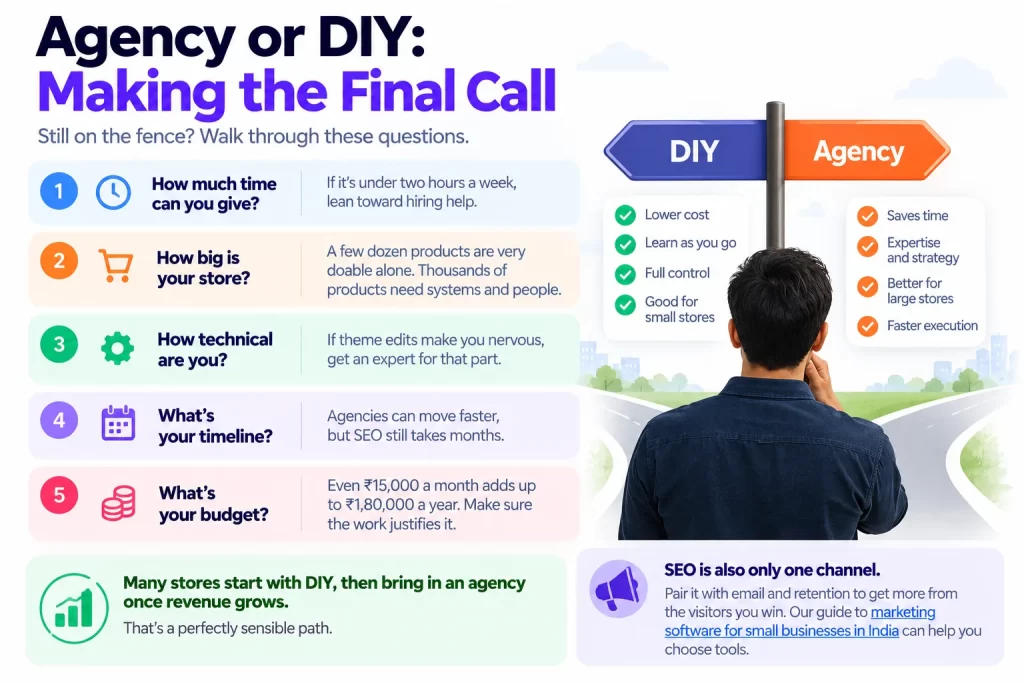
Many stores start with DIY, then bring in an agency once revenue grows. That’s a perfectly sensible path.
SEO is also only one channel. Pair it with email and retention to get more from the visitors you win. Our guide to marketing software for small businesses in India can help you choose tools.
Conclusion: Your Next Step
Shopify gives you a strong start, but it doesn’t finish the job. Duplicate URLs, thin collection pages and heavy apps can quietly hold your store back.
If you want help, shortlist a few agencies and verify them properly. Ask for a sample audit, a written scope and clear reporting. Be wary of guaranteed rankings and very low quotes.
If you’d rather go DIY, work through the checklist in order. Fix the foundations first, then collections, products, speed and content. Review your results every month.
Here’s your action plan for this week:
- Verify your store in Search Console.
- Pick your top five collection pages.
- Rewrite their titles and intros.
- Remove one app you don’t need.
Do those four things, and you’ll already be ahead of many stores. Ready to go deeper? Save this checklist, share it with your team, and start with step one today.
Frequently Asked Questions
It varies widely. Listings range from a few thousand rupees to well over ₹1 lakh a month. Ecommerce-focused retainers often start around ₹35,000 for small stores. Price depends on catalogue size, competition and what’s included. Always ask for a written scope.
Yes, as a base. It handles the sitemap, HTTPS and canonical tags automatically. You still need to improve collection pages, product copy, structured data and speed. Think of Shopify as a good foundation, not a finished building.
Link internally to the main product URL, not the collection-based version. Shopify’s canonical tags help, but your links should agree with them. Review filter and variant URLs in Search Console, and use 301 redirects when you change or delete pages.
A freelancer suits small budgets and specific tasks, like a technical audit. An agency suits bigger stores that need content, development and reporting under one roof. Whichever you pick, check Shopify experience, case studies and reviews.
No one can guarantee it. You can improve your odds with clear answers, complete product data, correct schema, fresh content and mentions on trusted sites. Set up Google Merchant Center too, so your products are easy for Google to read.