



Imagine opening your laptop on a Monday morning and finding your website gone. Your email is silent too. No orders, no customer messages, nothing.
- Why Domain Renewal Matters More Than You Think
- How to Renew a Domain Name Step by Step
- What Happens When a Domain Expires?
- Domain Expired? How to Recover It
- Renewing a .in Domain: What Indian Owners Should Know
- Why Is My Domain Renewal Price Higher in 2026?
- Auto-Renew or Multi-Year Renewal: Which Is Better?
- Common Domain Renewal Mistakes to Avoid
- How to Protect Your Domain From Being Lost or Hijacked
- Conclusion
- FAQs
The cause is often painfully simple. A card expired, a reminder landed in spam, or auto-renew was never switched on. By one estimate, over 150,000 domain names expire worldwide every day. Most are abandoned on purpose. Some belong to people who just forgot.
This guide explains how to renew a domain name the right way. You will also learn what happens after expiry, how to recover a lapsed domain, and why renewal prices keep climbing. We cover .in domains, UPI and card failures, and the 2026 price changes too. By the end, you will have a simple plan to keep your domain safe.


Why Domain Renewal Matters More Than You Think
A domain is not something you buy once and own forever. Think of it as renting a shop. You pay for a set period, and the lease ends if you stop paying. The registrar, which is the company you bought the name from, only holds it for you while your registration is active.
When a domain lapses, several things break at once:
- Your website stops loading.
- Your business email bounces.
- Payment pages, webhooks, and app logins tied to the domain can fail.
- Email campaigns lose their sender authentication, so they may land in spam or fail.
- Search engines may drop pages if the outage drags on.
This hits online sellers hardest. If your store runs on one of the best ecommerce platforms in India, your domain is the sign above the door. Lose it and customers can’t find you. Checkout can break too, which matters if you depend on one of the top payment gateways in India. Newsletters suffer as well, so anyone using the best marketing software for small businesses in India should keep sender domains current.


The fix is easy once you know the steps. Let’s start there.
How to Renew a Domain Name Step by Step
The menus differ from one registrar to another. The logic stays the same.
- Step 1: Find Out Where Your Domain Is Registered
Your registrar may not be your web host. Many people buy hosting in one place and the domain in another.
Not sure which is which? Run a WHOIS or RDAP lookup on your domain. It shows the registrar and the expiry date. You can also search your inbox for old receipts from names like GoDaddy, Namecheap, Hostinger, BigRock, or MilesWeb. - Step 2: Log In and Open Your Domain List
Sign in and look for “Domains,” “My Domains,” or “Billing.” At Hostinger, for example, you open Billing, then Subscriptions, and click Renew Now beside the domain.
Can’t get in? Fix that first. Use the password reset link, and make sure you can still receive mail at the address on file. Many failed renewals come down to an inbox nobody checks. - Step 3: Choose How Many Years to Renew
Most registrars allow one to ten years, though the limit depends on the extension. Some registrars cap .in at five years, so read the checkout page.
A longer term means fewer deadlines. It also protects you from future price rises on the years you have already paid for. - Step 4: Pay and Keep the Invoice
Complete the payment and download the invoice. You will want it for tax records, especially if you claim GST credit. Many small businesses log it in one of the best accounting software options in India so recurring costs never surprise them.
- Step 5: Confirm the New Expiry Date
Open the domain page and check the date. Renewing an active domain causes no downtime. If you are reactivating an expired one, Hostinger says it can take up to 48 hours to fully propagate.
What About Registrar-Specific Steps?
The path is similar everywhere. At GoDaddy, BigRock, or Namecheap, open your domain list, select the name, and choose Renew. At Squarespace Domains, which took over from Google Domains, use the domain’s registration or billing settings. Menus change often, so treat this as a signpost, not a script.


What Happens When a Domain Expires?
Expiry is not instant deletion. Most domains move through a few stages, and each one costs more than the last. Timing varies by extension and registrar, but here is the common pattern.
Stage 1: The Grace Period
Right after expiry, the domain enters a grace period. It often lasts up to 30 days, and some registrars allow around 40. You can usually renew at the normal price. Your site and email are typically offline though, and a few extensions have no grace period at all.
Stage 2: The Redemption Period
Miss the grace period and the domain moves into redemption, which lasts about 30 days. You can still get it back, but you pay a redemption fee on top of renewal. One guide puts typical fees at roughly $80 to $200. Transfers and edits are usually blocked during this stage.
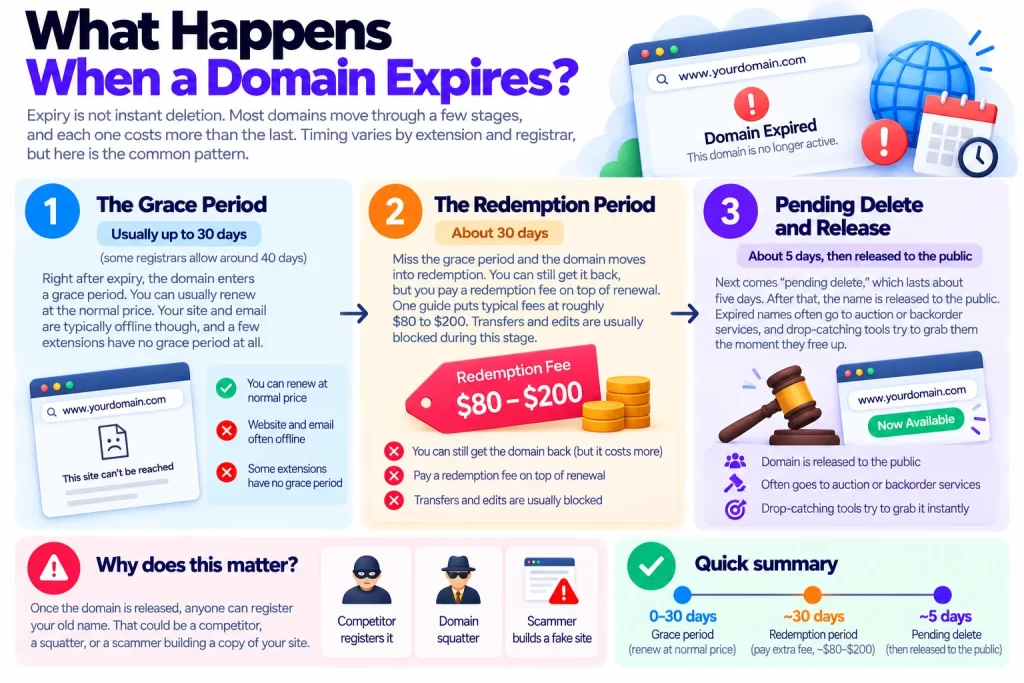
Stage 3: Pending Delete and Release
Next comes “pending delete,” which lasts about five days. After that, the name is released to the public. Expired names often go to auction or backorder services, and drop-catching tools try to grab them the moment they free up.
Why does this matter? Because anyone can then register your old name. That could be a competitor, a squatter, or a scammer building a copy of your site.
Domain Expired? How to Recover It
Don’t panic, but move quickly. Each day costs either money or risk.
If You Are in the Grace Period
- Log in to your registrar.
- Find the expired domain.
- Renew it at the standard price.
- Give DNS up to 48 hours to settle.
If You Are in Redemption
- Look for a Restore or Redeem button, or contact support.
- Ask for the full cost, including the redemption fee and renewal.
- Pay, then wait. Some registrars take several days to restore the name.
After restoration, some registrars lock the domain for a while. Plan any transfer for later.
If the Domain Was Already Released
Your options narrow, but they exist:
- Place a backorder through an auction platform.
- Contact the new owner politely, and expect to pay.
- If they misuse your brand, a dispute policy may apply. For .in names, that is the INDRP, covered in IN Registry’s published policies.
Ignore random messages offering “guaranteed recovery.” Many are scams. Only use your registrar’s own dashboard.
Renewing a .in Domain: What Indian Owners Should Know
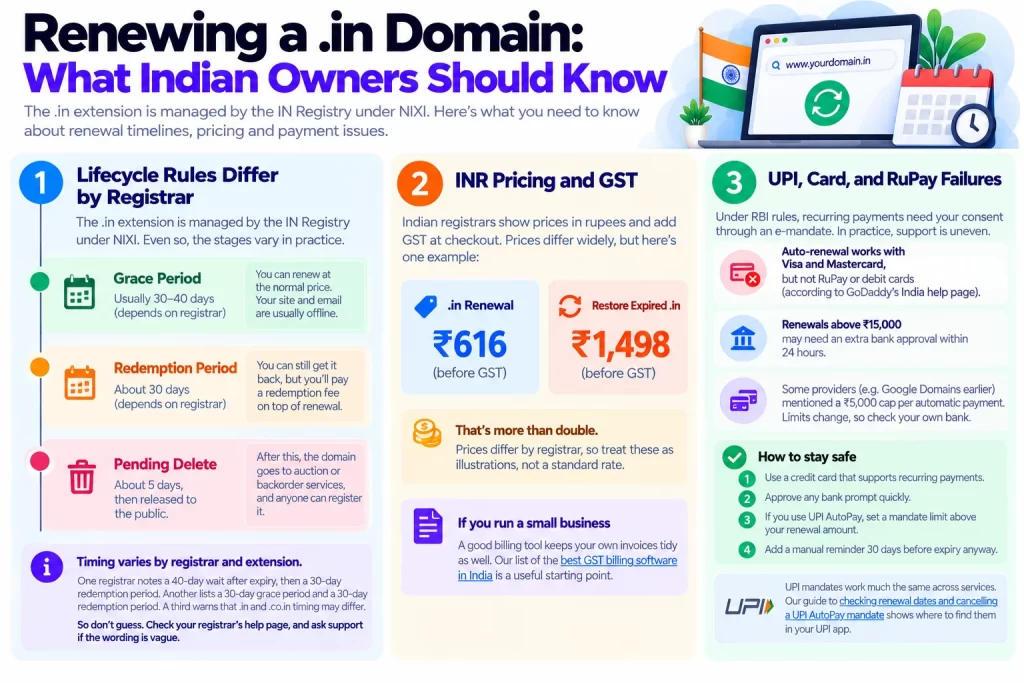
Lifecycle Rules Differ by Registrar
The .in extension is managed by the IN Registry under NIXI. Even so, the stages vary in practice. One registrar notes a 40-day wait after expiry, then a 30-day redemption period. Another lists a 30-day grace period and a 30-day redemption period. A third warns that .in and .co.in timing may differ.
So don’t guess. Check your registrar’s help page, and ask support if the wording is vague.
INR Pricing and GST
Indian registrars show prices in rupees and add GST at checkout. As one example, a registrar lists .in renewal at ₹616 before GST, while restoring an expired .in costs ₹1,498 before GST. That is more than double. Prices differ widely, so treat these as illustrations, not a standard.
If you run a small business, a good billing tool keeps your own invoices tidy as well. Our list of the best GST billing software in India is a useful starting point.
UPI, Card, and RuPay Failures
This is where many Indian owners get caught. Under RBI rules, recurring payments need your consent through an e-mandate. You can read the RBI notification on card e-mandates for the background.
In practice, support is uneven. GoDaddy’s India help page says auto-renewal works with Visa and Mastercard but not RuPay or debit cards. It also says renewals above ₹15,000 may need an extra bank approval within 24 hours. Google Domains, before the move to Squarespace, once described a ₹5,000 cap per automatic payment. Limits change, so check your own bank.
Here is how to stay safe:
- Use a credit card that supports recurring payments.
- Approve any bank prompt quickly.
- If you use UPI AutoPay, set a mandate limit above your renewal amount.
- Add a manual reminder 30 days before expiry anyway.
UPI mandates work much the same across services. Our guide to checking renewal dates and cancelling a UPI AutoPay mandate shows where to find them in your UPI app.
Why Is My Domain Renewal Price Higher in 2026?
You may have paid very little in year one and far more at renewal. That is normal. Registrars compete on first-year price, so the renewal column is where they earn their margin. It is also the price you pay in most years.
Registry increases add to it. Here is what changed in 2026:
- .com: From November 1, 2026, Verisign’s wholesale price rises 7%, from $10.26 to $10.97 a year. Each registrar adds its own margin, so your price may move by more or less.
- .org: A registry increase took effect on June 1, 2026. Reports describe it as a double-digit rise.
- Identity Digital extensions: Prices changed across 226 extensions on October 6, 2026.
- Newer extensions: Namecheap flagged another registry increase for several extensions on August 25, 2026.
Some registrars invite customers to renew before the date. Years you have already paid for are not billed again at the new rate.
How can you keep costs down?
- Check the renewal price before you buy, not after.
- Compare renewal prices, not just first-year deals.
- Renew key domains for several years.
- Consider a transfer. It adds one year, often at a promotional price.
One catch: new or recently transferred domains can be locked for 60 days. ICANN approved changes to this policy in June 2026, but they are not live yet. Don’t plan around a shorter lock.
Auto-Renew or Multi-Year Renewal: Which Is Better?
Why choose? Each fixes a different problem.
Auto-renew charges you before expiry. It works well until a card fails or a bank asks for approval. Then it fails quietly.
Multi-year renewal removes the deadline for a while. It costs more upfront, and it only helps if you actually keep the domain.
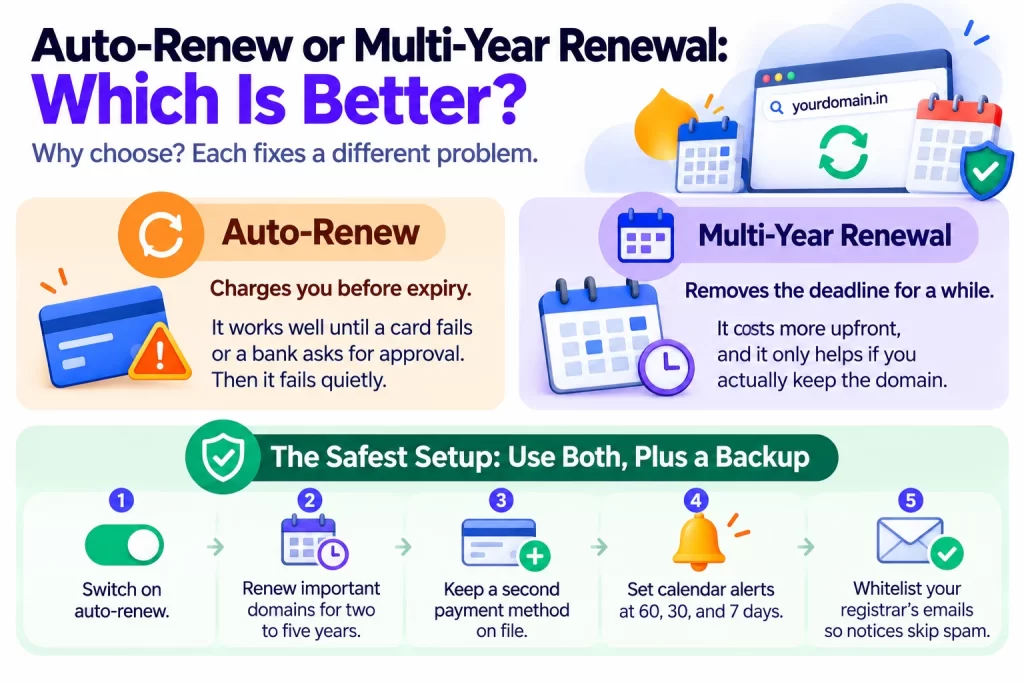
The safest setup uses both, plus a backup:
- Switch on auto-renew.
- Renew important domains for two to five years.
- Keep a second payment method on file.
- Set calendar alerts at 60, 30, and 7 days.
- Whitelist your registrar’s emails so notices skip spam.
Common Domain Renewal Mistakes to Avoid
Most losses come from small, avoidable slips:
- Assuming hosting includes the domain. They are often billed separately.
- Leaving the account with someone else. A developer or agency may hold your registrar login. Make sure you own it.
- Ignoring notices. Renewal emails often sit in spam.
- Waiting for the last day. One failed payment then becomes a crisis.
- Relying on one card. Cards expire, and banks block payments.
How to Protect Your Domain From Being Lost or Hijacked
Forgetting is not the only risk. Hijacking usually happens through social engineering, a compromised email account, a registrar weakness, DNS tampering, or an expired-domain takeover.
Use this checklist:
- Turn on registrar lock. It blocks unauthorized transfers, and it is free at most registrars.
- Enable two-factor authentication on your registrar account.
- Use a separate recovery email. Never use an address on the same domain. If it expires, you lose the very inbox that receives the warnings.
- Keep contact details current. Name, email, and phone should be real and reachable.
- Renew WHOIS privacy so your personal details stay hidden. It often has its own renewal date.
- Guard your auth code. Share it only when you are truly transferring.
- Consider registry lock for high-value names. One source puts it at about €50 to €300 a year.
- Beware fake invoices. Scam emails often imitate renewal notices. Renew only from your own dashboard.
Finally, watch your site from the outside. An uptime monitor and a basic SEO audit catch problems early. Our roundup of the best SEO tools for small businesses in 2026 lists several free options.
Conclusion
Renewing a domain takes five minutes. Losing one can take months to fix.
Here is the short version:
- Know your registrar and your expiry date.
- Turn on auto-renew, and keep a backup payment method.
- Renew important names for several years.
- Act inside the grace period, because redemption costs far more.
- Check .in rules and UPI or card limits if you are in India.
- Lock the domain, enable two-factor authentication, and use a separate recovery email.
Your next step is simple. Open your registrar account today and check the expiry date of every domain you own. If one expires within 90 days, renew it now, especially .com names before November 1. Then turn on auto-renew and set your reminders. Future you will be grateful.
FAQs
Log in to your registrar, open your domain list, select the domain, and choose Renew. Pick the number of years and pay. Many registrars allow renewal well before expiry, and early renewal simply adds time to the end of your current term.
Your site and email usually go offline. You then enter a grace period of around 30 to 40 days, when you can renew at the normal price. A redemption period of about 30 days follows, with an extra fee. After that, the domain is released and anyone can register it.
Common causes are an expired card, a RuPay or debit card that doesn’t support recurring payments, a UPI mandate limit that is too low, or a bank approval step you missed. Pay manually first to protect the domain. Then fix the mandate.
Sometimes. A transfer adds a year, and the new registrar may price it at a promotional rate. But new or recently transferred domains can face a 60-day lock. Unlock the domain, get the auth code, and start early. You also can’t transfer a domain that has already expired, so renew it first.
WHOIS privacy often has its own renewal date, so check it in your account. If the domain expires, DNS stops working and email goes with it. Messages bounce until the domain is restored and DNS has settled.